Monitoring is Your Friend
or, How I stopped worrying and learned to love the monitoring
tl;dr
I set up VictoriaMetrics and Grafana to monitor my Proxmox cluster and diagnosed an IOWait issue causing periodic slowdowns of the whole cluster. Also, using Ceph on consumer SSDs is Maybe Very Bad, so I'm planning to migrate off, which will necessitate spinning down the swarm as well.
My monitoring saga continues. In addition to Graylog I spun up VictoriaMetrics. If you're not familiar VictoriaMetrics is supposed to be a drop in replacement for Prometheus and InfluxDB with a far smaller memory and CPU footprint. It comes in every flavor you could want: binary, docker image, cluster, single node. I went with a single node binary deployment on an LXC because that was simple and I could wrap my head around it. The docs for that are here.
If you don't know what InfluxDB or Prometheus are, neither did I! I just wanted shiny graphs of how stuff in my cluster was doing and Reddit seemed fairly convinced VictoriaMetrics was a reasonable choice. So far it's done everything I've wanted it to and I haven't had to touch it since setting it up, so... Yay!
I went with an LXC over a dockerized deployment of some kind because they're just simpler, which I wanted for 'critical' infra like log collection or metric monitoring. I maintain some resilience because I can migrate LXCs between particular proxmox nodes, so if I have to take one down I still have my tools, which is essential for anything I want to use while troubleshooting. Bonus, and it's much easier to troubleshoot an LXC than an orchestrated container, IMO, and LXCs have a vastly smaller footprint than an all-up VM.
VictoriaMetrics setup
My VictoriaMetrics systemd unit files and YAML configs
I largely just followed the docs, which mostly pointed me to a binary bundle on their Github page and then dumped me into a copious command line reference. Suffice to say it's not necessarily batteries included, but it's not far off either.
I kinda love the VictoriaMetrics docs because they're so simple, but it was a bit of a jolt for someone used to apt install thing && systemctl enable --now thing when I wanted something to Just Work. I've written unit files before to invoke tailscale serve as a daemon, so I tried my hand at one to just... run VictoriaMetrics:
1 [Unit]
2 Description=VictoriaMetrics service
3 After=network.target
4
5 [Service]
6 Type=simple
7 User=victoriametrics
8 Group=victoriametrics
9 ExecStart=/usr/local/bin/victoria-metrics-prod -storageDataPath=/var/lib/victoria-metrics -retentionPeriod=90d -selfScrapeInterval=10s -httpAuth.username=admin -httpAuth.password=file:///etc/victoriametrics/victoria-login-password.txt
10 SyslogIdentifier=victoriametrics
11 Restart=always
12
13 PrivateTmp=yes
14 ProtectHome=yes
15 NoNewPrivileges=yes
16
17 ProtectSystem=full
18
19 [Install]
20 WantedBy=multi-user.target
VictoriaAuth is theoretically optional, but if you don't want the whole universe to be able to write to your instance then you should set it up. You can see in my VM service config above I pass a txt file containing a plaintext HTTP password: VMAuth can proxy requests with a bearer token to the VMetrics backend, handling basic HTTP auth for you, which is nice for the various things that you may want to ingest metrics from but may not have support for HTTP auth.
Note also all my metrics transit via Tailscale, so I'm not concerned about encryption in transit (e.g. TLS).
1 [Unit]
2 Description=VictoriaAuth Server
3 After=network-online.target tailscaled.service victoriametrics.service
4 Wants=network-online.target tailscaled.service victoriametrics.service
5
6 [Service]
7 ExecStart=/usr/bin/vmauth-prod -auth.config=/root/auth-config.yml
8 Restart=always
9
10 [Install]
11 WantedBy=multi-user.target
My auth config is then just some YAML with a bunch of plaintext secrets:
1 users:
2 - bearer_token: RANDOMLY_GENERATED_TOKEN_OF_YOUR_CHOICE
3 url_prefix: "http://localhost:8428"
4 headers:
5 - "Authorization: Basic YOUR_PLAINTEXT_HTTP_BASIC_PASSWORD_SET_IN_VM_CONF"
Once it's all booted you should be able to get to the Victoria Metrics UI by going to http://victoria-metrics:8428/vmui/#/, which should prompt you for HTTP basic auth if you followed my setup. The VMAuth proxy should be running at 8247, but I don't have a great way to test that besides ginning up raw curl requests.
Which you could do, but I didn't do.
Proxmox Metrics -> VictoriaMetrics
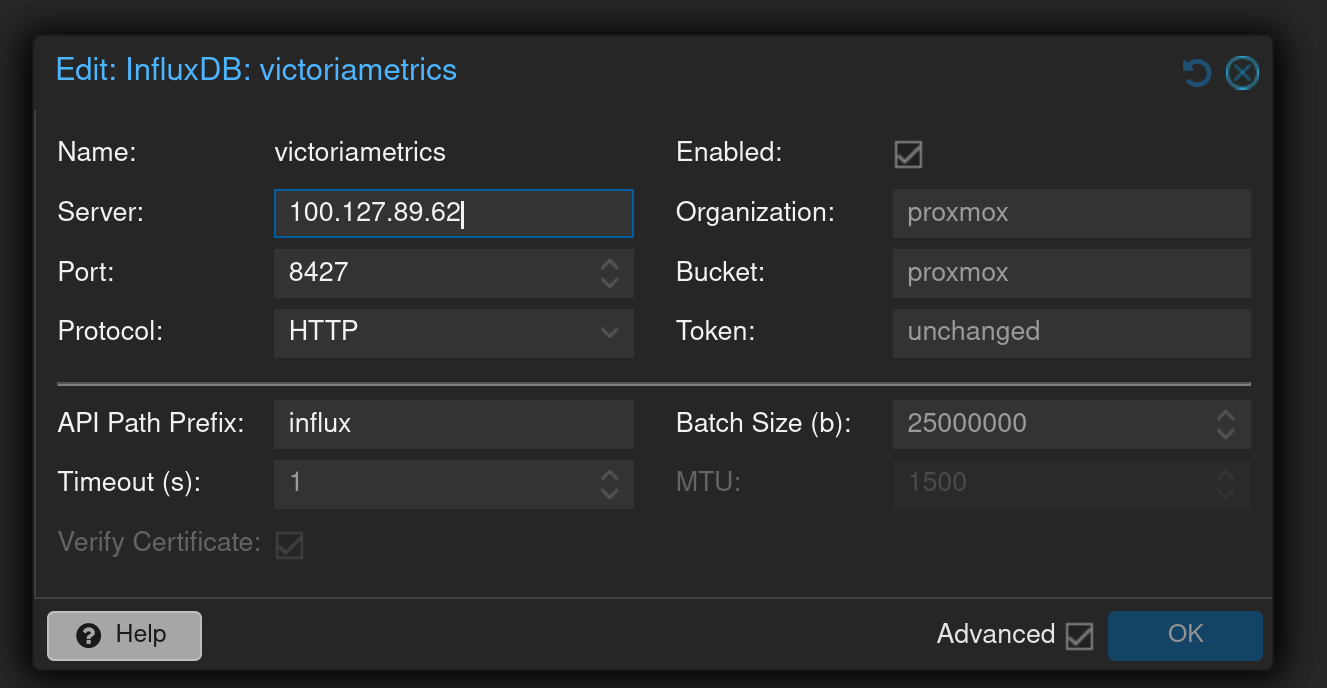
With VictoriaMetrics set up we can then start dumping metrics in. I started with hooking up Proxmox. Proxmox has built-in support for sending metrics to Influx; just add a metric server with the following config:
- server: ip of your VictoriaMetrics instance (I used my tailscale IP)
- port:
8427if you're using the VMAuth proxy,8428if you're writing directly to VictoriaMetrics. - protocol:
http(again, my transit is encrypted via Tailscale) - api path prefix:
influx - token: the bearer token you set in your
auth-config.yaml
It looks like this in the UI:
check journalctl; if you see lines like this, something is wrong:
Apr 13 20:01:19 pve01 pvestatd[1191]: metrics send error 'victoriametrics': 500 Can't connect to 100.127.89.62:8427 (Connection timed out)
Apr 13 20:01:39 pve01 pvestatd[1191]: metrics send error 'victoriametrics': 500 Can't connect to 100.127.89.62:8427 (Connection timed out)
Apr 13 20:01:40 pve01 pvestatd[1191]: metrics send error 'victoriametrics': 500 Can't connect to 100.127.89.62:8427 (Connection timed out)
Apr 13 20:02:00 pve01 pvestatd[1191]: metrics send error 'victoriametrics': 500 read timeout
Apr 13 20:02:01 pve01 pvestatd[1191]: metrics send error 'victoriametrics': 500 read timeout
Apr 13 20:02:02 pve01 pvestatd[1191]: metrics send error 'victoriametrics': 500 read timeout
Apr 13 20:02:03 pve01 pvestatd[1191]: metrics send error 'victoriametrics': 500 read timeout
At this point we should merrily be sending metrics to VictoriaMetrics. You can theoretically examine VictoriaMetrics directly to verify that timeseries data is coming in:
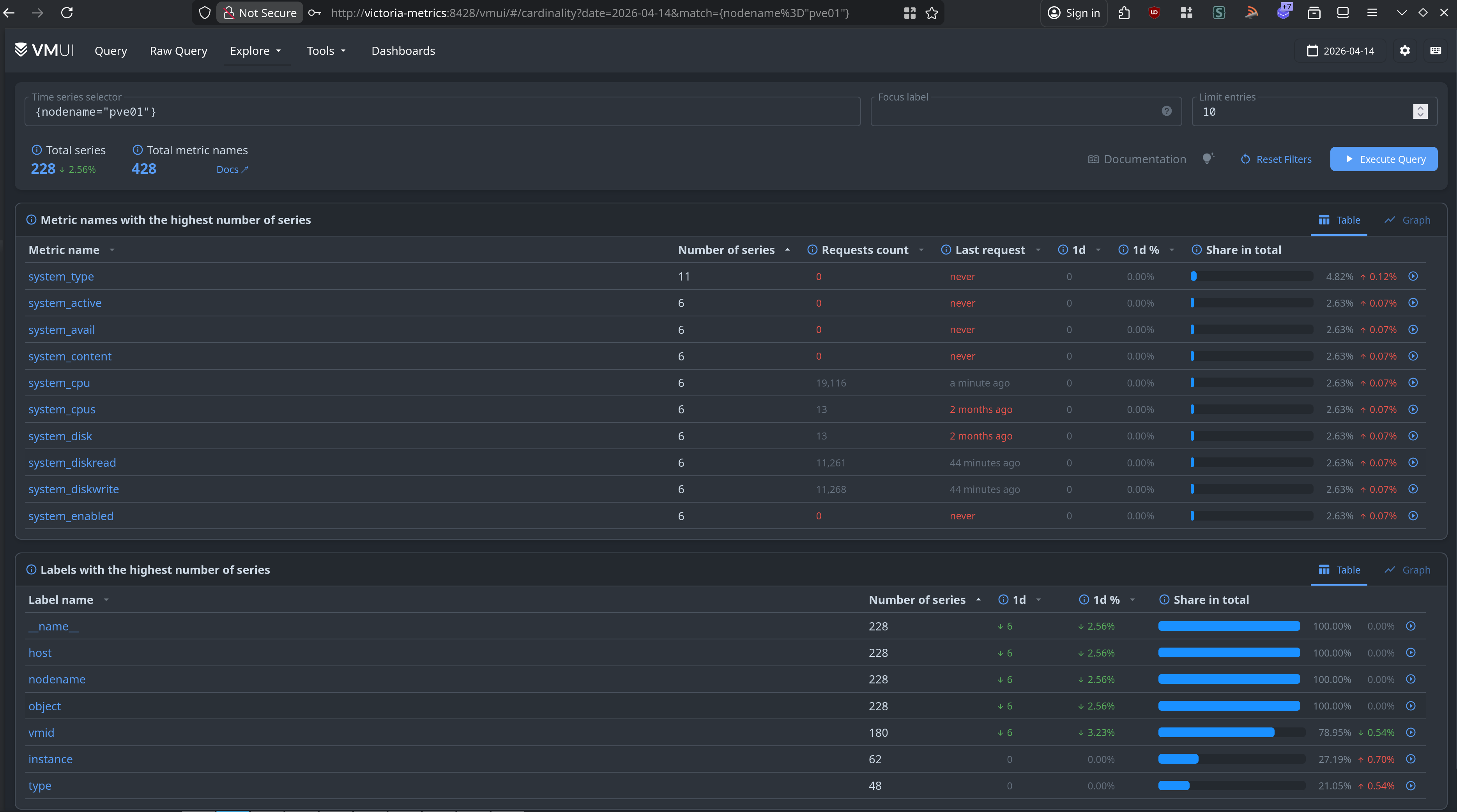
I have no idea what this query language is or how it's supposed to work. I should learn that, but in the meantime there's Grafana, the tool everyone seems to use for making cool dashboards for their homelabs. Wouldn't you know it, but it can use Prometheus and InfluxDB as inputs!
Setting up Grafana
I spun up an LXC via Proxmox Community Scripts. I went with the Alpine version because I want to keep the footprint as small as I can.
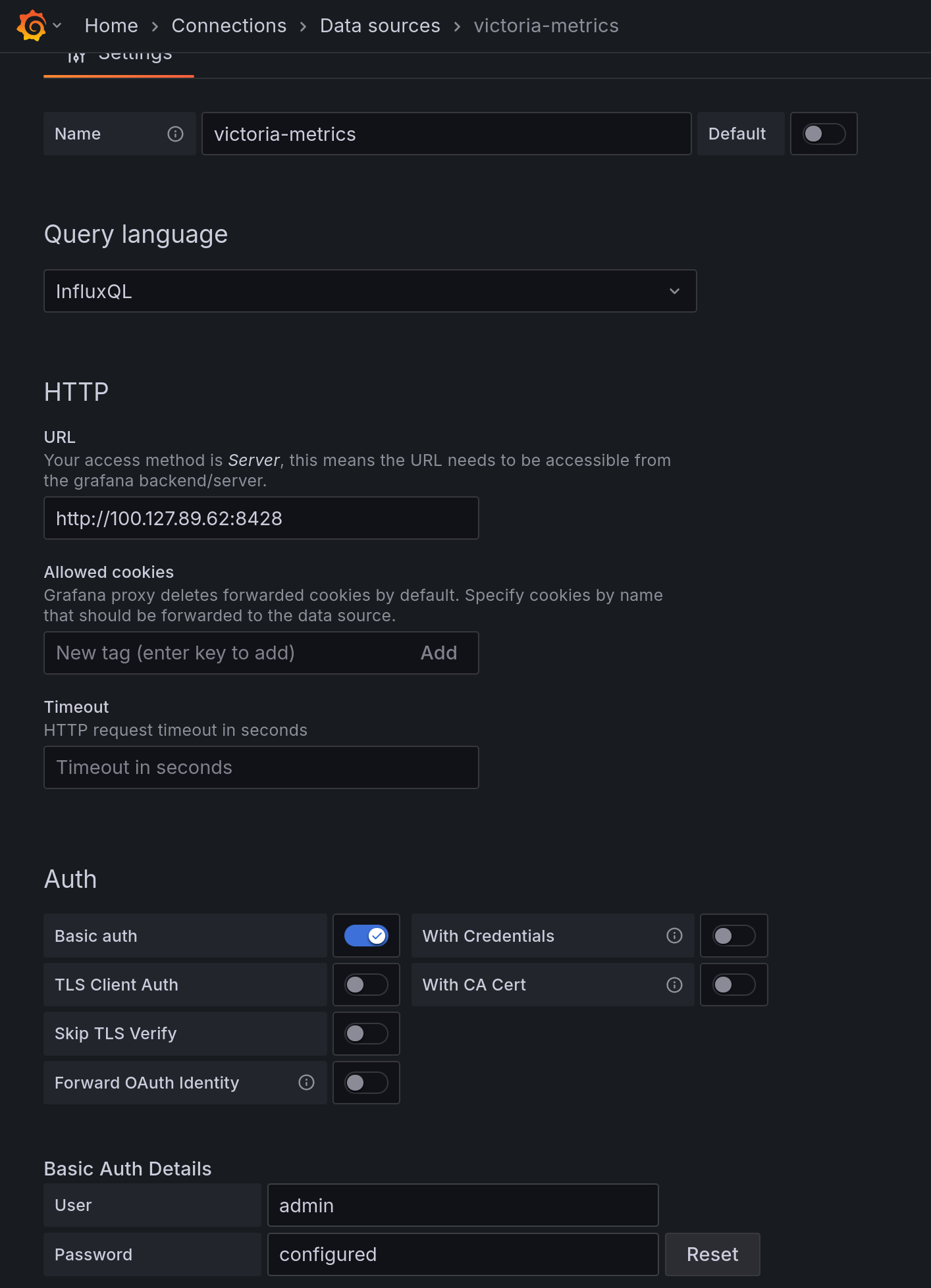
Set up VictoriaMetrics as an Influx source (note I set up HTTP basic auth against the raw VictoriaMetrics instance, bypassing VMAuth):
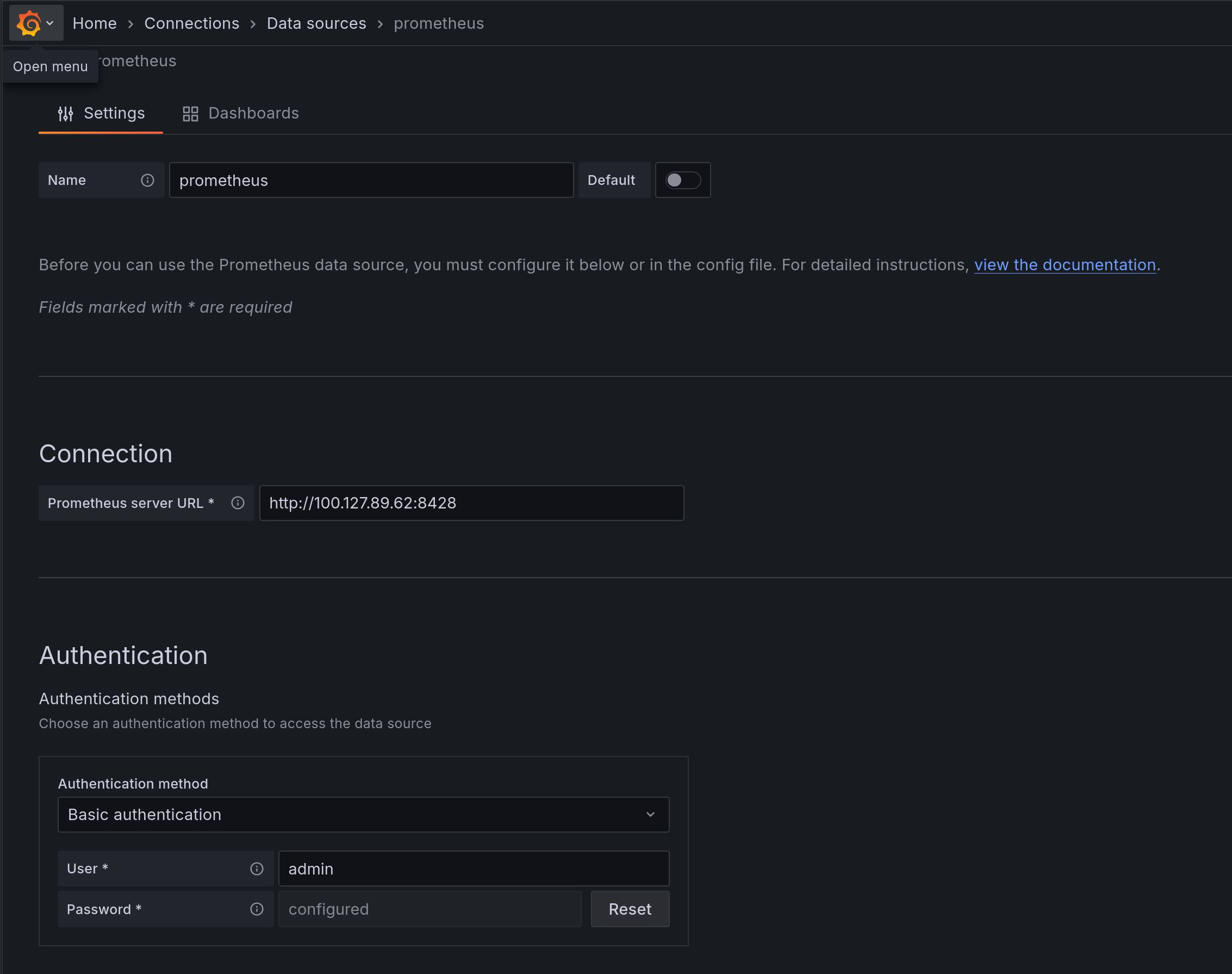
And while we're here, set up a Prometheus input too:
And now, finally, you can create a dashboard! Or use an existing one. I started with this one, though I modified it a bit to work better (imo) in a multi-node cluster (mostly through adding wildcard support).
If you're particularly enamored with mine for whatever reason, here's a link to the JSON for it.
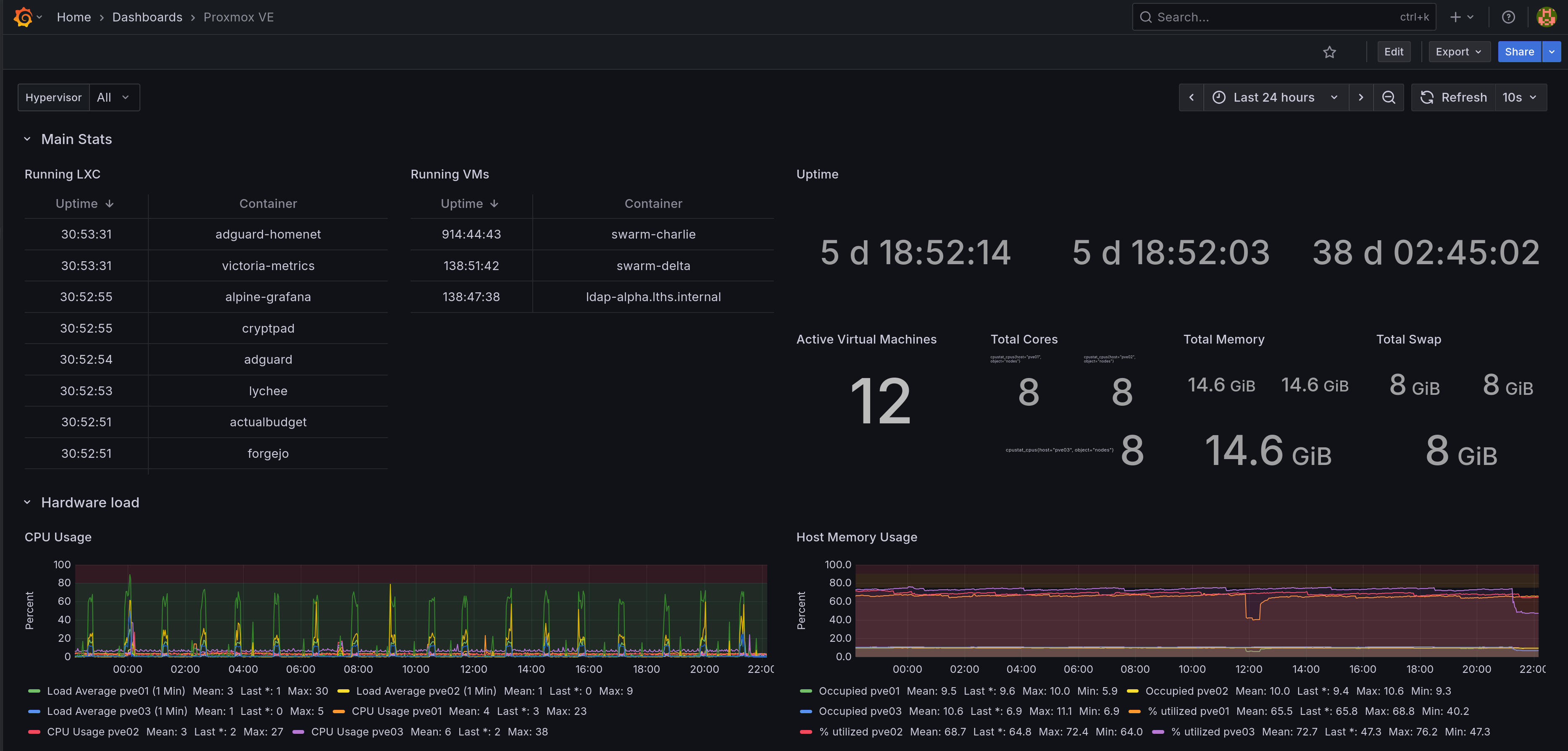
Huzzah! Dashboard!
Hey wait, what's up with those CPU spikes?
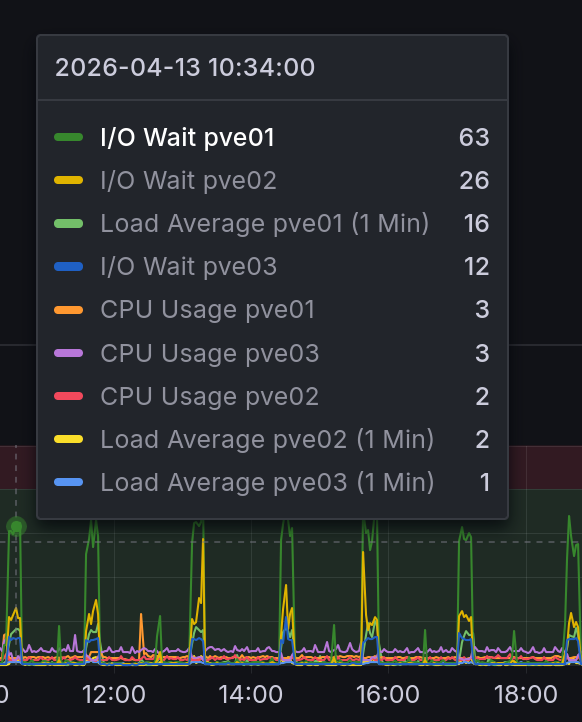
uhhh that can't be good.
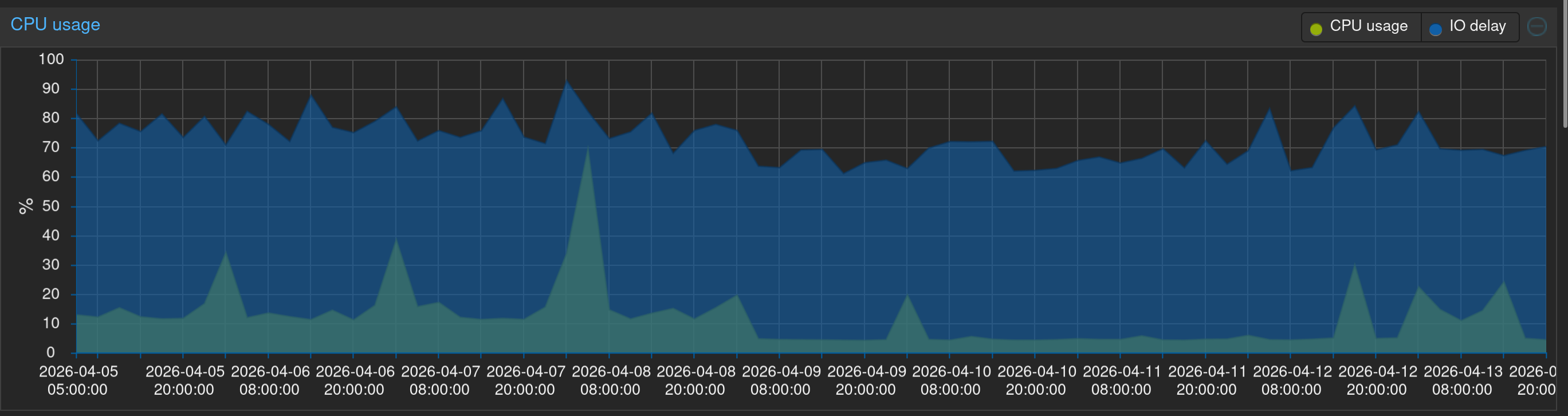
That would explain why some VMs seem to randomly become excruciatingly slow. Looking through the logs on the host it's even affecting connectivity:
Apr 13 20:00:33 pve01 tailscaled[640]: open-conn-track: timeout opening (TCP 100.125.198.105:59938 => 100.127.89.62:8427) to node [n9M7e]; online=yes, lastRecv=24s
Apr 13 20:00:34 pve01 tailscaled[640]: open-conn-track: timeout opening (TCP 100.125.198.105:59952 => 100.127.89.62:8427) to node [n9M7e]; online=yes, lastRecv=25s
Apr 13 20:00:36 pve01 tailscaled[640]: open-conn-track: timeout opening (TCP 100.125.198.105:59966 => 100.127.89.62:8427) to node [n9M7e]; online=yes, lastRecv=26s
Thankfully, we have this helpful dashboard to help figure out what's going wrong. The obvious thing could be some VM or LXC doing a ton of writes.

Well, it's not an LXC. What about the VMs?

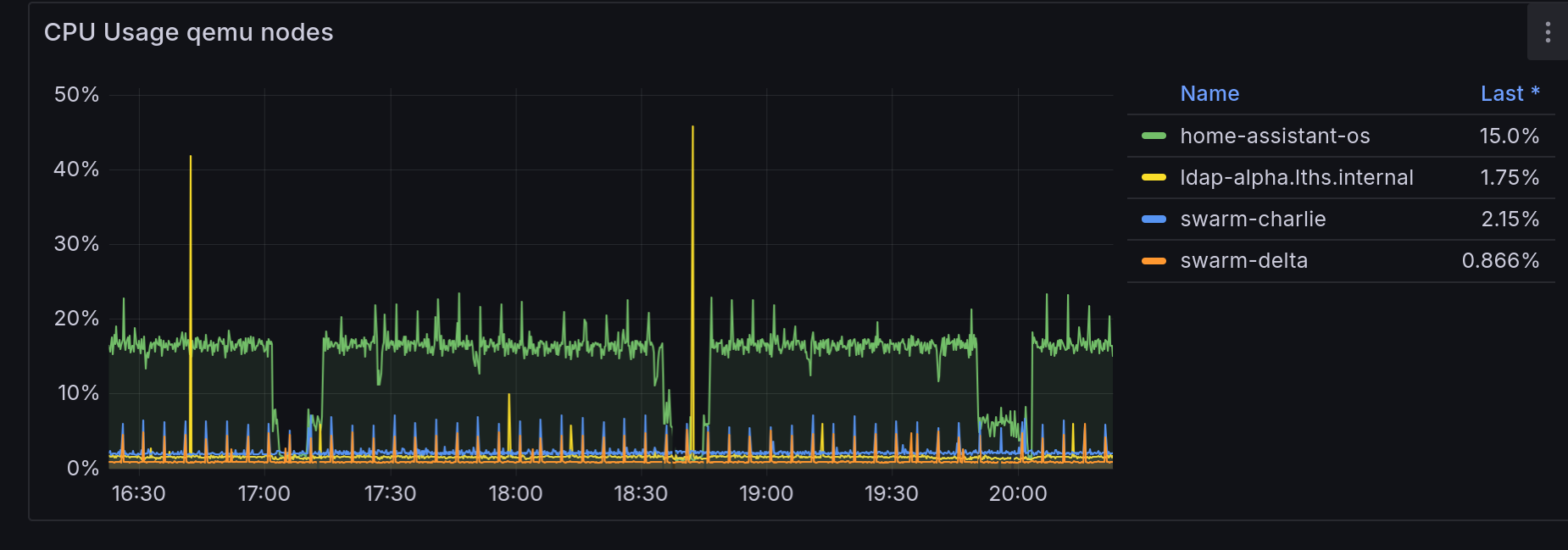
Hm, there's a little bit from home-assistant-os. There is a cyclic pattern to it. Is it the same cyclic pattern? Let's zoom in a bit.
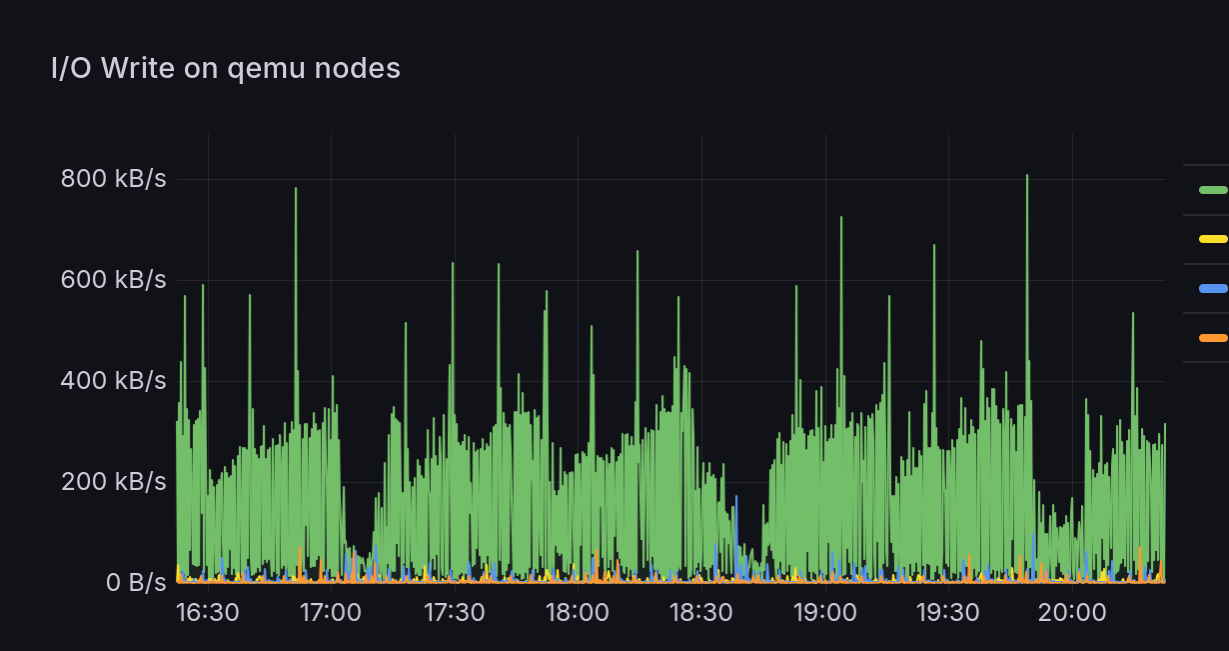
Okay, let's correlate; here's CPU usage by VM, that's definitely looks related.
And compared to the host IOWait...
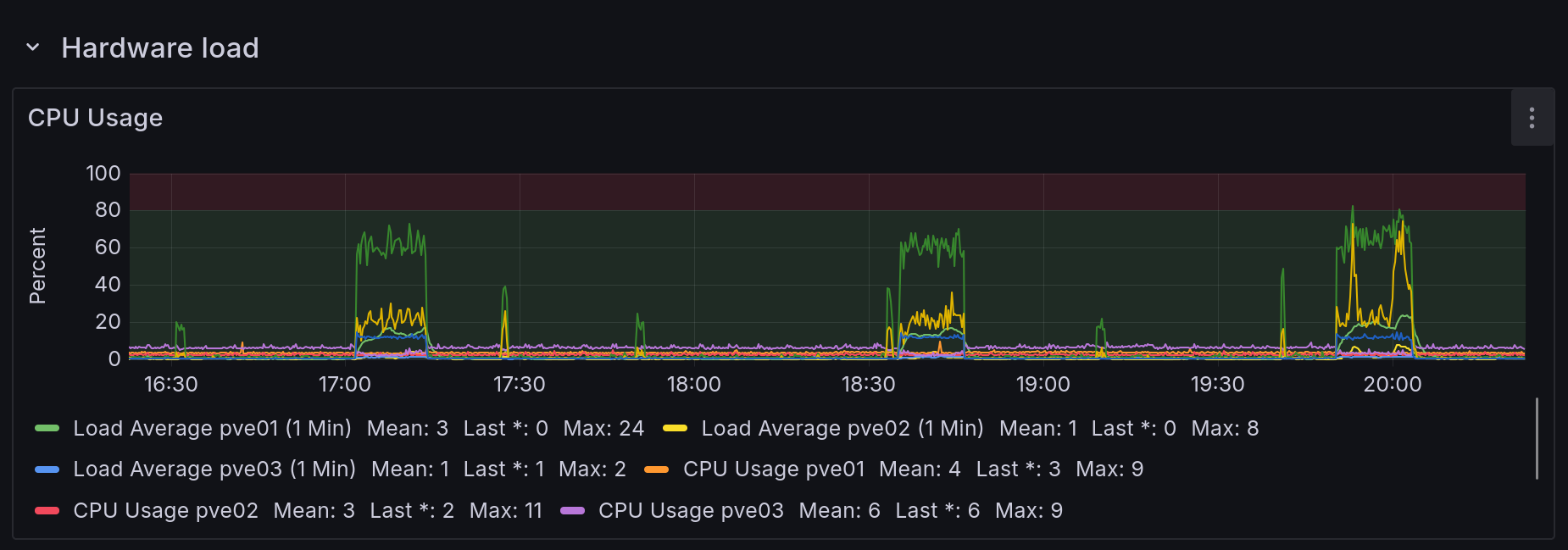
Yep, it looks like the VM constantly writes a bit, then does something which tanks its CPU utilization (io?), and at the same time the hardware iowait spikes, implying the VM is stuck waiting for whatever IO is happening to finish. DB summary, maybe? Who knows. But the VM's disk lives on Ceph, so whatever writes are being done then replicate across the network oh no.
Let's get that disk off the ceph storage and onto the node's local LVM:
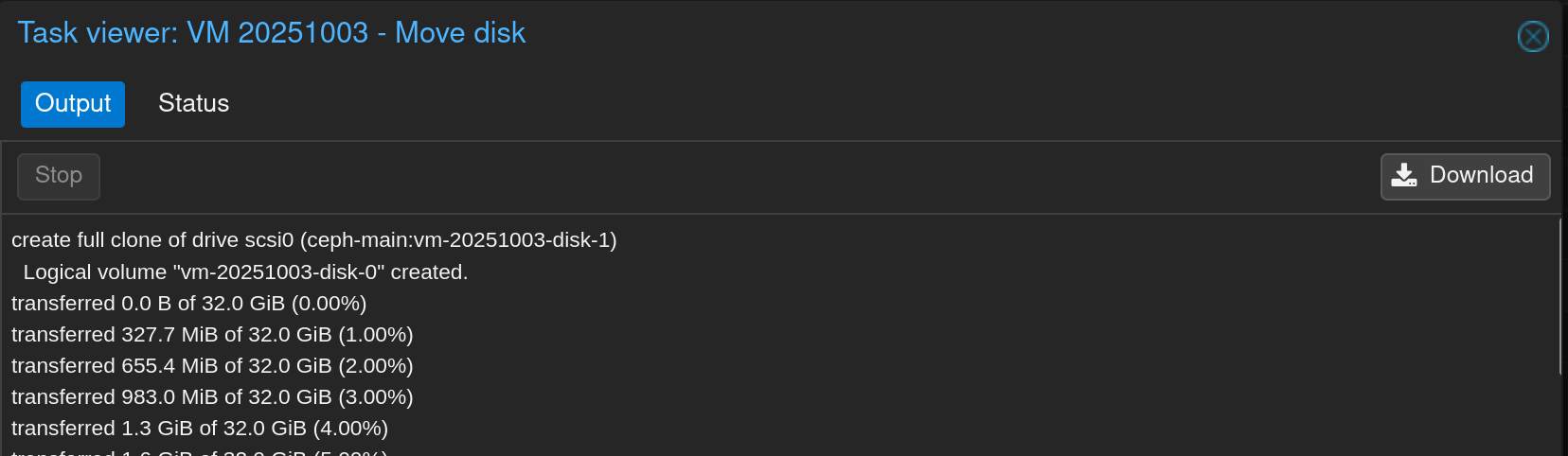
Phew, that's much better.
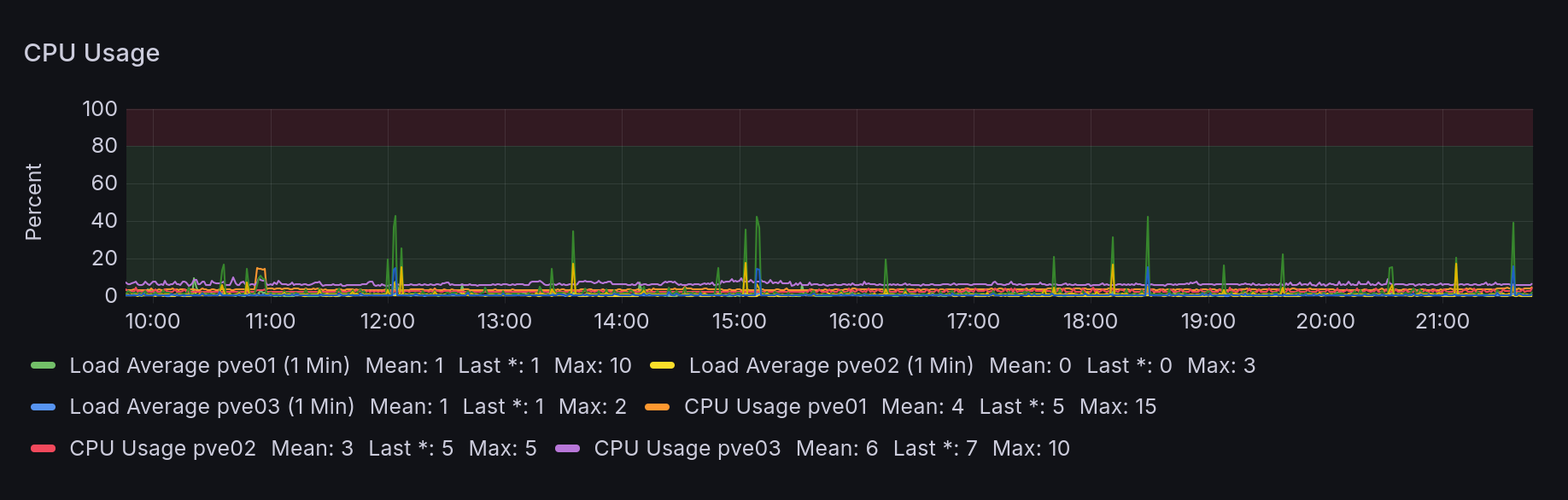
As a bonus, the HAOS CPU isn't getting stuck cyclically anymore either:
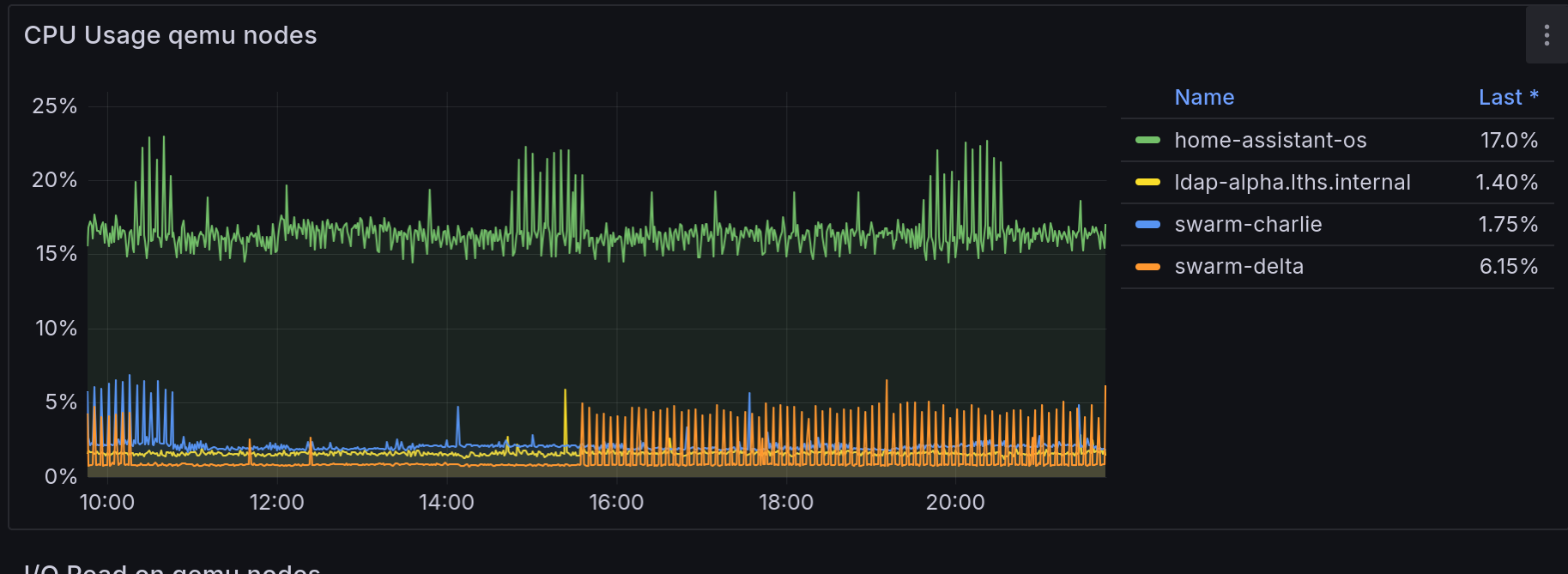
Hey wait, those graph timestamps are different!
Okay, yeah, so it was late when I figured all this out, so after I moved the disk I went to bed, intending to collect a screenshot immediately after all that to show how everything was smooth sailing. Instead I woke up to my internet appearing offline and my Proxmox nodes doing a gigabit of traffic between them:
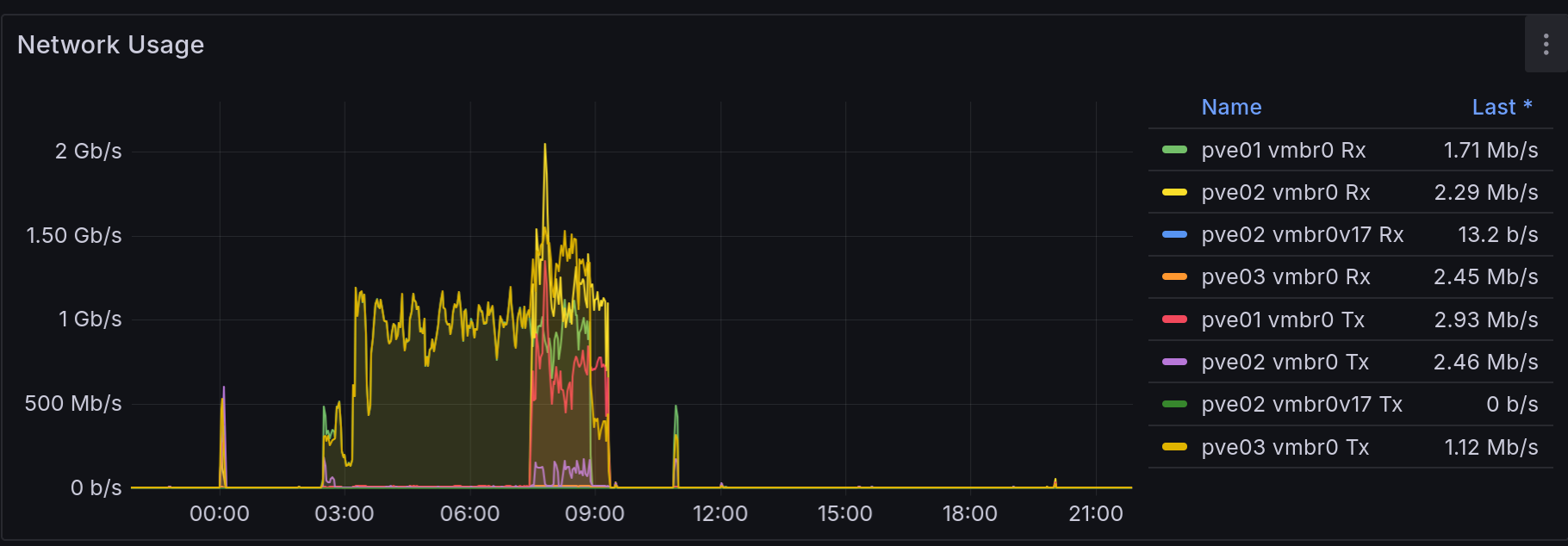
Took me a while to figure out exactly what was wrong; I got distracted rebooting my router a couple times, believing the storm had blipped my internet and my UDMP and telco modem stopped getting along again before I noticed my UDMP could in fact reach the internet, just my phone wouldn't load anything. That should have been my first clue: I wasn't getting the page load failure of no internet, I was getting infinite loading of slow internet.
Thankfully, I had a random notification from my alerting about a failed DNS lookup in one of my app healthchecks which put me back on the right track. (Unfortunately said alerting is slightly busted and seems to edit a single alert instance instead of sending a new one, so unfortunately I can't show you.) First I tried an nslookup against one of my adguard LXCs: it hung. Then I tried SSHing into said adguard: that also hung. Alright, well, we have this handy dashboard:
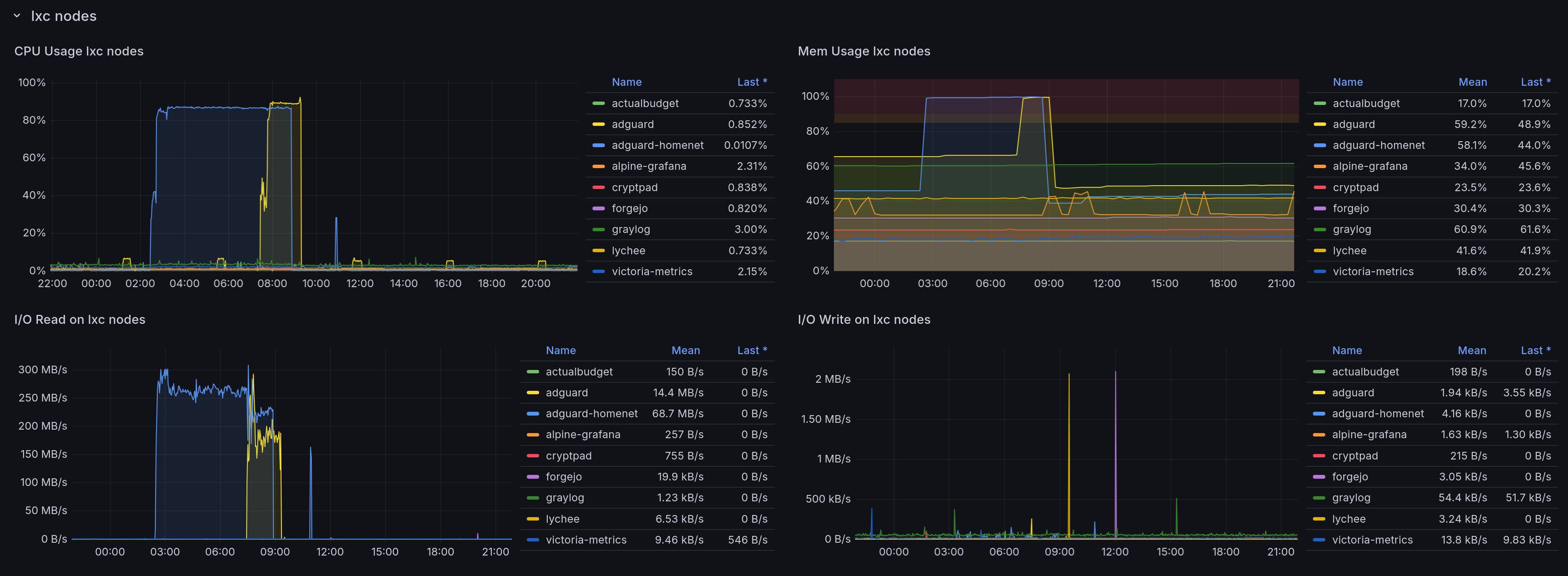
Huh. Well, I don't know what caused the memory to go through the roof, and I didn't realize that 200MB/s of disk read would cause 2Gbps worth of network traffic between every damn Ceph node but here we are.
Anyway, I rebooted both and everything returned to normal, but it trashed the neat "and then everything was fine!" followup I was planning, so now the graphs don't line up.
For good measure I did some googling and found a thread where Ceph can experience high latency on consumer SSDs due to how it handles some operations by default (e.g. multithread sync RW). With the default configuration Ceph can exhaust the cache space on consumer SSDs and then everything gets slow.
Thankfully, this github thread had guidance on switches to flip for various configurations of disks:
# For SSD / NVMe OSDs
ceph config set class:ssd bdev_enable_discard true
ceph config set class:ssd bdev_async_discard_threads 1

# For HDD OSDs
ceph config set class:hdd bdev_enable_discard false
ceph config set class:hdd bluestore_slow_ops_warn_lifetime 60
ceph config set class:hdd bluestore_slow_ops_warn_threshold 10

# OR for specific OSDs
ceph config set osd.5 bluestore_slow_ops_warn_threshold 10
ceph config set osd.5 bluestore_slow_ops_warn_lifetime 60
For various reasons (but this among them) I'm reconsidering having used Ceph as my distributed storage tech. I'm also considering migrating off Swarm and onto k3s: in part because I keep cutting myself on how Swarm's ancient Compose syntax doesn't support extremely useful things like inline config files, and also because the selfhosting book I'm reading has a whole bit on spooling up k3s and I'm easily swayed by shiny things.
What I'll probably end up doing is just migrating everything running in the swarm off to the NAS, then de-ceph-ifying my cluster (possibly repaving it to Proxmox 8 in the process), then spinning up k3s and SeaweedFS or some such.
So... stay tuned for that, I guess.