Return Of The Docker Swarm
As part of my renewed interest in all things blogging I wanted to set up a feedreader. I was partly inspired by this post, "Discovering the Indieweb with calm tech" that made it on Hackernews. I started my search on the Proxmox Community Scripts repo. I have a Proxmox cluster already spun up, and I'm trying to avoid adding services to my Unraid docker stack for reasons I'll get into later. Community scripts had CommaFeed which seems good, but doesn't have OAuth login. I prefer services with OAuth so I can share them with my family.
I searched around for OAuth capable selfhosted feedreaders and came across FreshRSS, which has OAuth support, but wants to be run in a Docker container. I could figure out how to run it directly on an LXC, which is a kind of Linux container Proxmox natively supports with a small footprint, but this felt like a good excuse to pick up a project I'd been putting off.
My Unraid NAS has a pile of Docker services running on it, some single containers, some in Compose stacks. I've been meaning to migrate them off for the sake of redundancy, but I don't have a single host with the resources of my NAS. I'd dabbled in using a swarm before but that was a year and change ago, so none of the infra is still up.
So, I stood up a docker swarm with replicated shared storage via Ceph, which of course was the simplest and most expedient way to solving my problem (/s). It was kind of insane and I'm gonna document how I did it if only to make myself feel like it was somehow a good idea in the end, and inevitably when I need to make changes and can't remember what I did.
I'll give some quick background. If you're not interested, you can skip to Part Zero where I detail the plan.
Why do this?
Missing Context
Some of the "why" in this won't be clear without a full writeup of what runs on my homelab and how I use it. I'm trying to not spider too deep on the various projects have, so I'm gonna keep the context here surface-level and just accept that there might be some confusion. I plan to write a more comprehensive overview of my lab soon. (Famous last words.) Until then, I apologize for any confusion from the missing links in this context.
Right, so, in the beginning there was the NAS. The NAS was great! A frankencomputer cobbled together out of bits and bobs of cast-off enterprise hardware, consumer grade bits of PCs that had been replaced, and whatever the hell I could get off eBay, all running the glorious Slackware derivative that is Unraid. It's got a bunch of storage and, even better, Docker, making it supremely easy to run things like Immich and have it backed with large, redundant storage. Even better, with the Compose plugin, you can run docker compose stacks, which makes it easier to run more complex services or, say, have a unique Tailscale hostname for each application that's technically running on the same box.
I love my NAS. Unfortunately, the NAS is physically large, and has like 16 individual disks. When we moved recently I bought a knockoff Pelican case to tote the individual disks and disassembled my entire server rack. I didn't re-assemble it or the NAS for a few months, all the while I didn't have access to any of the services that the NAS hosted, which was very annoying.
In the last year I've stood up a bunch of webapps on the NAS, some of which my partners use. When I was the only user it was fine if I knocked the NAS offline for a few hours for maintenance or whatever. It's rather annoying to everyone else who may be using those services if I just YOLO reboot the thing on a random Tuesday afternoon.
Also, it scares me having "essential" services like the FreeIPA domain controller and the Authentik OAuth gateway living only on the NAS. It's boot disk died a couple months ago and, while I brought it back, it was a stark reminder of the fragility of complex systems and how much I've come to rely on that single computer. A close friend of many years ago had introduced me to the idea of managing systems as cattle, not pets, and I'm finally starting to understand his point.
I had a few goals:
- Make as many of the shared household services redundant w.r.t. the NAS being offline for an extended period of time
- Maintain the functions I have: being able to expose services to my Tailnet, OAuth, functional internet access, etc.
- Ideally support easily deploying additional applications via Docker.
- Tolerate underlying hardware failures / a swarm member going offline
Relying on external services
I'm not thrilled about the reliance I've placed on centralized and commercial services to support my activities. I usually err strongly on the side of open and free-as-in-speech technologies. That said, I don't currently have the bandwidth to learn how to e.g. unroll Docker containers to run the services I actually care about, and/or in hosting my own Headscale control plane. (I've done that before; it works okay, but the second you add other less techy people into the mix the UX gets awful.)
Tailscale effectively solves a problem for me and they provide infrastructure to do it. They also commit resources to supporting Headscale. Similarly, Docker is the de facto standard for distributing applications and they commit a fair amount of infra to supporting open source endeavors. I consider them useful enough w.r.t. the problems they solve to use despite my reservations.
All that said: if I don't pin my docker images and, say, Authentik upgrades to a breaking change, or if Tailscale is down, or if I migrate off tailscale: I'm slightly screwed when it comes to logging into my shared services, or my FreeIPA managed account on one of the multi-user PCs. I'll pontificate on this more later.
Part Zero: The super awesome plan, or how I learned to stop worrying and love Proxmox
The short version
- Docker Swarm
- backed by Ceph, running on my Proxmox cluster (three miniPCs)
- Two swarm VMs running on the cluster, one on Unraid
- my Unraid box has loads of spare compute and RAM, unlike my proxmox cluster. The Swarm will function off two nodes, so we still retain our "operate without the NAS" requirement if it goes offline
- I may add another Proxmox node for some more RAM and compute, but it won't have additional storage for Ceph
- Deploy FreshRSS to the swarm with a Tailscale sidecar
- Profit?
Minimum number of node members
Distributed orchestration systems have minimum numbers of "voting nodes" such that they'll maintain quorum if one goes offline. Almost universally that minimum number is three to support "high availability." This is so if one node goes offline the remaining two maintain a majority voting "quorum" for cluster decision-making.
Docker Swarm can and will run with fewer nodes, i.e. two (or even one). If you only have two nodes the Swarm will lose quorum if one goes down and won't be able to place tasks.
Similarly, Ceph will run with two nodes, but will go down if you lose one. Three is the ideal minimum for fault tolerance.
The long version
I already have a Proxmox cluster with a bunch of single-application LXCs. An LXC is like a cross between a Docker container and a VM. It is a container, technically: it shares the host's kernel and has namespaced filesystems/process space/networking/etc, but it's intended to be more persistent than a docker container. LXCs aren't immutable and "feel" much more like a VM than a container. They're a nice in between.
The folks at the Proxmox Community Scripts have curated a bunch of setup scrips for quickly standing up an LXC for a specific application, dependencies and all. I've used a few of them: actualbudget, Home Assistant, adguard. They're decent, but they're tricky to update and not every application has an LXC setup script.
If I had the time, I'd learn how the community packages stuff as LXCs and then just... do that a lot. It'd be a nice way to give back, and it's on my to-do list, but in the meantime I often run into applications I want to run that don't have an easy LXC setup.
There's other options: NixOS apparently has configurations for FreshRSS, so I could stand up a NixOS LXC like this guy did (shoutout Imran for linking me to that) and then run the service on that...
...and I did try that! I ran headfirst into the learning cliff of how NixOS works. From the things Imran has said about it I think it's worth trying (more declarative more good), but by the time I made it to Nix I'd already spent a ton of effort trying to get Gluster to work and I didn't want to stall out.
But I'm getting slightly ahead of myself. Starting from "I want to run this docker image, redundantly" there's two very obvious places to start: Kubernetes, and Docker Swarm. I hear k8s is powerful as all hell and it's what all the cool kids use. The same close friend who taught me the "computers are cattle, not pets" was a k8s evangelist to the point of setting up his own baremetal cluster on a bunch of raspis back in 2019. Alas, I do not know k8s. I could learn it, but I do already know Docker Compose, which is the primitive behind Docker Swarm.
Also, I've dabbled with using Docker Swarm before. The last time I had three VMs on my Proxmox cluster as swarm nodes and I used GlusterFS to replicate an attached virtual disk across them. I deployed... Stuff? to it? I remember making a Monica instance, but I never really used it for more than that. I don't remember why.
Swarm solves all the problems I have though:
- It runs docker images. I want to run docker images.
- It orchestrates the containers across a compute pool. If a node goes down, it starts it somewhere else. It does fancy overlay network shenanigans to route requests across the swarm.
- It consumes a config language I already understand: compose files!
- It doesn't require anything other than itself. the last time I tried to roll my own k8s system I got analysis paralysis about ingress managers and DNS providers and I don't even know what.
The one thing swarm doesn't solve is storage replication, but neither does k8s. Proxmox technically solves it via ZFS sync, but that only runs on a schedule, it doesn't stream changes. If I lose a Proxmox node for whatever reason it won't auto-launch the VM/LXC, and I may not have the updated state to run it from. Swarm will solve the compute, but I need another way to solve the storage.
> Why replicate storage at all?
Docker Swarm handles orchestrating compute. It'll take a container configuration--the image, environment variables, configuration, port mappings, etc--and deploy that configuration to a member of the swarm. If the node goes down, Swarm will handle restarting the container on another node. However, Swarm does not handle storage, so if a container is moved form one node to another and is expecting a certain folder to exist, and/or to contain data you'll run into problems. We could bind containers to specific nodes, but that defeats the purpose of having a cluster anyway.
> What's Gluster?
Gluster is a Red Hat project for replicating storage across multiple nodes. You pass it a folder and it does ✨ fancy math ✨ to distribute it across other Gluster nodes (which need not be synonymous with Swarm nodes) with some amount of fault tolerance. The last time I used Swarm I followed a guide that set up Gluster to handle the storage side of the equation.
> So... Use Gluster again?
That was my original plan; the downside of Gluster is it's... clunky. It required adding a virtual disk to each VM and has nontrivial compute and memory overhead. the additional virtual disk makes it hard to migrate the Swarm node off a given physical host and complicates backups. That storage would also be tied up even if it wasn't holding data, which is annoying since my Proxmox cluster doesn't have a ton of storage to spare.
I also couldn't figure out how to expose the distributed disk to Docker easily. I could expose an individual "brick" easily enough, but that would sidestep Gluster's synchronization mechanics and possibly lead to a race condition between a container starting and replication finishing. There's several Docker volume drivers for Gluster, but they all seem unmaintained.
Also, while I was trying to set Gluster up, I saw a lot of posts by people saying they'd had data loss due to the Gluster cluster (lol) corrupting.
> I have a feeling this is leading somewhere
Indeed it is! I'd initially been working off @scyto's Gist about his gluster-backed-swarm and found his current notes about migrating off Gluster in favor of Ceph.
> What's Ceph?
Ceph is another clustered storage system. It operates at the level of individual disks to replicate across multiple hosts. It's very fancy and I don't understand it well enough to summarize, but the cool part is it's built into Proxmox.
I couldn't use it before because my Proxmox hosts didn't have a separate disk for Ceph to use: they only had their boot disks. When I rebuilt my cluster I added terabyte SSDs to each node, and a 2.5g network card. The throughput on the card leaves something to be desired, but the storage works fine.
My predecessor at a previous job also built a petabyte Ceph storage cluster across two nodes, so I know it can handle my teensy traffic.
Part One: Standing up Ceph for shared storage
I mention this above, but you'll need a minimum of three nodes for Ceph to be happy. If you only have two nodes the Ceph cluster will halt if one goes offline, which will cause Problems(TM).
Turn Ceph on
Initializing Ceph is a cakewalk. You have to have disk(s) that aren't in use on each Proxmox node: no ZFS, not part of a RAID. From the Proxmox UI, on each node, go to the Ceph tab, install Ceph, then go to OSD, Create OSD, and feed it the unused disk.
You should also add monitors and managers to each of your nodes from the Ceph > Monitor pane in the UI.
Network isolation
The right way to run a Ceph network is on a dedicated high-speec (~25gigabit) network, separate from application, management, and cluster traffic. This assumes multiple NICs on your host (which I have) and a robust network setup with separate LANs or VLANs to handle these different traffic flavors (which I could have, but I'm lazy and didn't do).
Keep in mind I have no idea what I'm talking about; I don't use Proxmox professionally and I'm not an IT professional. That said, you'll probably want each of the following:
- A dedicated management network for Cluster communication.
- A dedicated network for application traffic / to host your VMs on.
- A dedicated network for Ceph
- All of those on separate physical NICs, so if one gets saturated with traffic it won't bring down the rest.
If you're gonna skimp on any I'd say you should combine the first two; keeping Ceph on it's own network is more important since, y'know, transferring storage around is bandwidth-intensive and more likely to mess with other traffic, whereas cluster management comms and application traffic tend to be lesser. Obviously that depends on your usecase.
Also I didn't do any of that, I shoved everything on the same network, so take all of the above with a grain of salt and YMMV. My homelab's network is separate from my general house network, so when I have people over they can't get to my proxmox hosts when they're on my wifi, so I have some semblance of a segmented network, but I should probably do more. Again though, I'm not a professional in this field.
There's a philosophy to OSD configurations that seems roughly akin to ZFS tuning, but my setup isn't complex enough to warrant that. The idea seems to be using fast disks as Write-Ahead-Logs for HDDs, which in turn make up the bulk of the cluster storage. More than that is beyond my understanding though. I'm hoping to pick up more server chassis in the next year an stand up a beefier proxmox cluster to do some testing on, but it'll be a while before I get there.
Anyway, once the Ceph is installed on each node and you've created OSDs on each node you can do all sorts of stuff. For our purposes we need a CephFS.
I don't know what CephFS is or how it differs from pools, but it can easily be mounted by our VMs. To create a CephFS you have to have at least one metadata server. I made one on each Proxmox node but, again, I don't know what I'm doing and am just winging everything.
Create a Ceph User
To access our CephFS from our Swarm VMs we need a Ceph user. This is very easy; from a Proxmox node shell, run this:
ceph auth add docker-swarm
Ta-da! you now have a ceph user! Now we have to give it rights to the CephFS. My CephFS is named cephfs-swarm, and the command to grant my new user access is this:
ceph fs authorize cephfs-swarm client.docker-swarm / rw
Note the prepended client.. The (extensive) Ceph user docs go into some detail on why that is. The tldr is it looks like future proofing somehow; don't worry about it, just know that Ceph usernames get prefixed with client..
Attach Ceph to your VMs
By the way, now is a great time to make some VMs. You'll want at least three for your swarm. I provisioned mine with three vCPUs and 8 gigs of RAM. They're VMs, so we can always tune them later.
Importantly in my case I put one of my VMs on my Unraid host, since it has resources to spare, so I couldn't leverage @Scyto's method of mapping the cephfs directly into the VMs as a virtIO shared disk. Instead I mounted the CephFS over the network. Obviously this has performance implications: I don't care.
The steps for this are very simple:
- On each VM, install
ceph-common. - On each VM,
touch/etc/ceph/ceph.conf. - On each VM, make your mountpoint:
mkdir -p /mnt/swarm-pool-
This path should be identical on all swarm nodes. You'll reference this path in your swarm stack files, which are node agnostic, so for the sharing to work properly the nodes have to "look" identical from the swarm manager's perspective
-
- From one of your proxmox nodes, copy the output of
ceph auth get client.docker-swarm(replaceclient.docker-swarmwith whatever the name of the ceph user you created above is) - On each VM, paste that output into
/etc/ceph/ceph.keyring- Ceph will automatically look here when authing. You can pass an explicit secret file in the fstab options if you like.
- On each VM, add the following to your
fstab, substituting names as appropriate:
[your ceph user]@.[your ceph FS name]=/ [mountpount on your VMs] ceph mon_addr=[IP of your first ceph/proxmox node]:6789/[IP of your second ceph/proxmox node]:6789/[IP of your nth ceph/proxmox node]:6789,noatime,_netdev 0 0
Mine looks like this:
docker-swarm@.cephfs-swarm=/ /mnt/swarm-pool ceph mon_addr=192.168.11.2:6789/192.168.11.115:6789/192.168
.11.78:6789,noatime,_netdev 0 0
You can use mount -a to test. Assuming there's no error output, you should see the mount via findmnt /mnt/swarm-pool and/or in df output!
Then, from one of your swarm nodes, you should be able to touch /mnt/swarm-pool/hiworld.txt and see it appear on another node! Huzzah! We can put whatever we want in here and it'll become available to other members of the swarm, which means we can just shove all our Docker mounts in here and get free data replication.
Part Two: Make a swarm
This part is a cakewalk. Install docker on your nodes:
# download and run the magic install script that Docker ships
# they say to only do this in development/testing environments.
# don't run random scripts off the internet as root in prod
curl -fsSL https://get.docker.com -o get-docker.sh
sudo sh get-docker.sh
# --now is basically systemctl enable && systemctl start
# works with disable, too!
sudo systemctl enable --now docker
Then, on your favorite node:
sudo docker swarm init
This will spit out a command you run on your other nodes to join them to the swarm.
Note
Like most distributed orchestration systems, Docker Swarm differentiates between "managers" and "workers" within the swarm. In theory it's good practice to separate your management nodes and your worker nodes such that your manager nodes don't have tasks placed on them. This makes sure that e.g. high load on a task doesn't disrupt management operations. This is also generally why you separate management networks and application networks and storage networks.
That's probably the kind of thing that's more relevant in large, enterprise-y deployments. In my case, I made all my nodes managers so that everything doesn't break when/if the only manager node goes down.
Adding a manager node is easy. Start on an existing manager node (e.g. the one you just ran
swarm initon) and run this:sudo docker swarm join-token managerWhich will give you a join command you run on your other nodes to bring them into the swarm as managers.
Now we have a swarm! We should test it by deploying something to it.
Part three: Actually deploy something
The goal is in sight! It took me a while to get to this point on my own, following a few failed forays into nixOS and Gluster and whatnot.
@scyto, our Homeric guide thus far, deploys Portainer to his swarm before doing anything else. You can do this too, but I didn't add a tailscale sidecar to my portainer, so it was only a half step towards my own goals.
Portainer is a useful UI though: it makes it easy to get to container logs and visualize the deployment. I recommend setting it up, but it's not the focus of this section. I also modified my configuration slightly to take advantage of my ceph mount; my stack file for Portainer is below.
Expand the doobley-doo for my portainer stackfile
1 version: '3.2'
2
3 services:
4 agent:
5 image: portainer/agent:2.17.1
6 volumes:
7 - /var/run/docker.sock:/var/run/docker.sock
8 - /var/lib/docker/volumes:/var/lib/docker/volumes
9 networks:
10 - agent_network
11 deploy:
12 mode: global
13 placement:
14 constraints: [node.platform.os == linux]
15
16 portainer:
17 image: portainer/portainer-ce:2.17.1
18 command: -H tcp://tasks.agent:9001 --tlsskipverify
19 ports:
20 - "9443:9443"
21 - "9000:9000"
22 - "8000:8000"
23 volumes:
24 - portainer_data:/data
25 networks:
26 - agent_network
27 deploy:
28 mode: replicated
29 replicas: 1
30 placement:
31 constraints: [node.role == manager]
32
33 networks:
34 agent_network:
35 driver: overlay
36 attachable: true
37
38 # this is the magic that'll sync data across swarm nodes
39 # remember that /mnt/swarm-pool is the mountpoint for our
40 # ceph volume on all of our nodes. You'll have to create
41 # the parent directory structure; for some reason the swarm
42 # doesn't do this on its own.
43 volumes:
44 portainer_data:
45 driver: local
46 driver_opts:
47 type: none
48 device: /mnt/swarm-pool/volumes/portainer_data
49 o: bind
The tricky bit for me was deploying an application with a Tailscale sidecar container. In a normal Docker compose setup this is easy, you just do something like this:
services:
  tailscale:
    image: tailscale/tailscale:latest
    container_name: tailscale-immich
    hostname: immich # Name used within your Tailscale environment
# [...]
    dns:
      - 100.100.100.100
      - 1.1.1.1
    # Healthcheck is helpful when other container depend on this one
    healthcheck:
# [...]
  immich-server:
    # this is the magic bit; this will route all network traffic for immich-server
    # through the tailscale service
    network_mode: service:tailscale
    container_name: immich_server
    image: ghcr.io/immich-app/immich-server:${IMMICH_VERSION:-release}
# [...]
    depends_on:
      - redis
      - database
      - tailscale
My DNS config is probably funky, but let's ignore that for now. I also have tailscale installed on my Unraid host, where my compose stacks run. I ran into some trouble getting that network setup to work within the swarm; I'm not certain on why, I think it has to do with the overlay network Swarm uses to pass traffic between containers on different hosts.
In any case, to get my deployment to work I had to slightly modify the DNS setup of the application container. For some reason just setting network_mode: service:tailscale didn't solve it, like it does in my Compose setup. I had to set the DNS of the application container to be 100.100.100.100, the MagicDNS Tailscale resolver, and add a fallback.
I'm not entirely certain that traffic outbound from the application container is going through the Tailscale sidecar. I'm a little worried it's just bubbling up to the host and traversing the host's tailnet connection. That will have security implications, if true. I'll troubleshoot it later, I'm jut happy it works at all right now.
Behold, my FreshRSS stackfile with a Tailscale sidecar
1 version: '3.2'
2 volumes:
3 tailscale_conf:
4 driver: local
5 driver_opts:
6 type: none
7 # this is where the serve config lives
8 device: /mnt/swarm-pool/shared/tailscale/freshrss-conf
9 o: bind
10 tailscale_state:
11 driver: local
12 driver_opts:
13 type: none
14 device: /mnt/swarm-pool/shared/tailscale/freshrss-state
15 o: bind
16 services:
17 tailscale:
18 image: tailscale/tailscale:latest
19 hostname: freshrss # this will be the name within the tailnet
20 environment:
21 - TS_AUTHKEY=${TS_AUTHKEY}
22 - TS_STATE_DIR=/var/lib/tailscale
23 - TS_USERSPACE=false
24 - TS_ENABLE_HEALTH_CHECK=true
25 - TS_LOCAL_ADDR_PORT=127.0.0.1:41234
26 - TS_EXTRA_ARGS=--advertise-tags=tag:container,tag:application,tag:sso-access
27 - TS_SERVE_CONFIG=/config/serve.json
28 # the stateful filtering bit is me troubleshooting DNS issues
29 - TS_EXTRA_ARGS=--accept-dns=true --stateful-filtering=false
30 volumes:
31 - tailscale_conf:/config # Config folder used to store Tailscale files - you may need to change the path
32 - tailscale_state:/var/lib/tailscale
33 devices:
34 - /dev/net/tun:/dev/net/tun
35 cap_add:
36 - net_admin
37 - sys_module
38 healthcheck:
39 test: ["CMD", "wget", "--spider", "-q", "http://127.0.0.1:41234/healthz"] # Check Tailscale has a Tailnet IP and is operational
40 interval: 1m # How often to perform the check
41 timeout: 10s # Time to wait for the check to succeed
42 retries: 3 # Number of retries before marking as unhealthy
43 restart: always
44 freshrss:
45 image: freshrss/freshrss:latest
46 container_name: freshrss
47 hostname: freshrss-app
48 restart: unless-stopped
49 network_mode: service:tailscale
50 depends_on:
51 - tailscale
52 logging:
53 options:
54 max-size: 10m
55 volumes:
56 # you can declare the volumes separately if you like, but a direct
57 # mapping works too.
58 - /mnt/swarm-pool/volumes/freshrss_data:/var/www/FreshRSS/data
59 - /mnt/swarm-pool/volumes/freshrss_extensions:/var/www/FreshRSS/extensions
60 # This tells the application container to route it's DNS requests
61 # to the Tailscale MagicDNS resolver at 100.100.100.100
62 # then to use 1.0.0.1 as a fallback resolver.
63 # I should _probably_ use my router instead, but I'm scared of breaking
64 # things again.
65 dns:
66 - 100.100.100.100
67 - 1.0.0.1
68 environment:
69 - TZ=America/Toronto
70 - CRON_MIN=3,33
71 # this is a bit me just throwing spaghetti at the wall
72 - TRUSTED_PROXY=172.18.0.1/24 127.0.0.1/32 192.168.11.1/24 10.0.2.0/24
73 # OIDC guide from https://freshrss.github.io/FreshRSS/en/admins/16_OpenID-Connect-Authentik.html
74 # if you don't want OAuth, you can drop all these env vars
75 - OIDC_ENABLED=1
76 - OIDC_PROVIDER_METADATA_URL=https://authentik.your-tailnet-name.ts.net/application/o/freshrss/.well-known/openid-configuration
77 - OIDC_REMOTE_USER_CLAIM=preferred_username
78 - OIDC_CLIENT_ID=go_get_your_own_client_secret
79 - OIDC_CLIENT_SECRET=${OIDC_CLIENT_SECRET}
80 # docs say 'no idea what goes here, random string OK'
81 - OIDC_CLIENT_CRYPTO_KEY=${OIDC_CLIENT_CRYPTO_KEY}
82 - OIDC_SCOPES=openid profile email
83 - OIDC_X_FORWARDED_HEADERS=X-Forwarded-Port X-Forwarded-Proto X-Forwarded-Host
and the serve config for tailscale:
1 {
2 "TCP": {
3 "443": {
4 "HTTPS": true
5 }
6 },
7 "Web": {
8 "${TS_CERT_DOMAIN}:443": {
9 "Handlers": {
10 "/": {
11 "Proxy": "http://freshrss-app:80"
12 }
13 }
14 }
15 }
16 }
Swarm DNS names
I use the Docker domain name of the application container,
freshrss-app, to route traffic from the tailscale container to the application. I'm fairly sure this is necessary in the case where the app container isn't on the same physical host as the Tailscale container and the proxied traffic has to transit the Swarm overlay network.Typically I just pass traffic to
localhost:whateverwhen usingnetwork_mode: service:tailscale, but that doesn't work in the Swarm deployment. I think that's becauselocalhostis nonsensical in the case when there's multiple replica containers of the application, but thinking about that opens several cans of worms I haven't muddled through yet, so YMMV.
And lo!
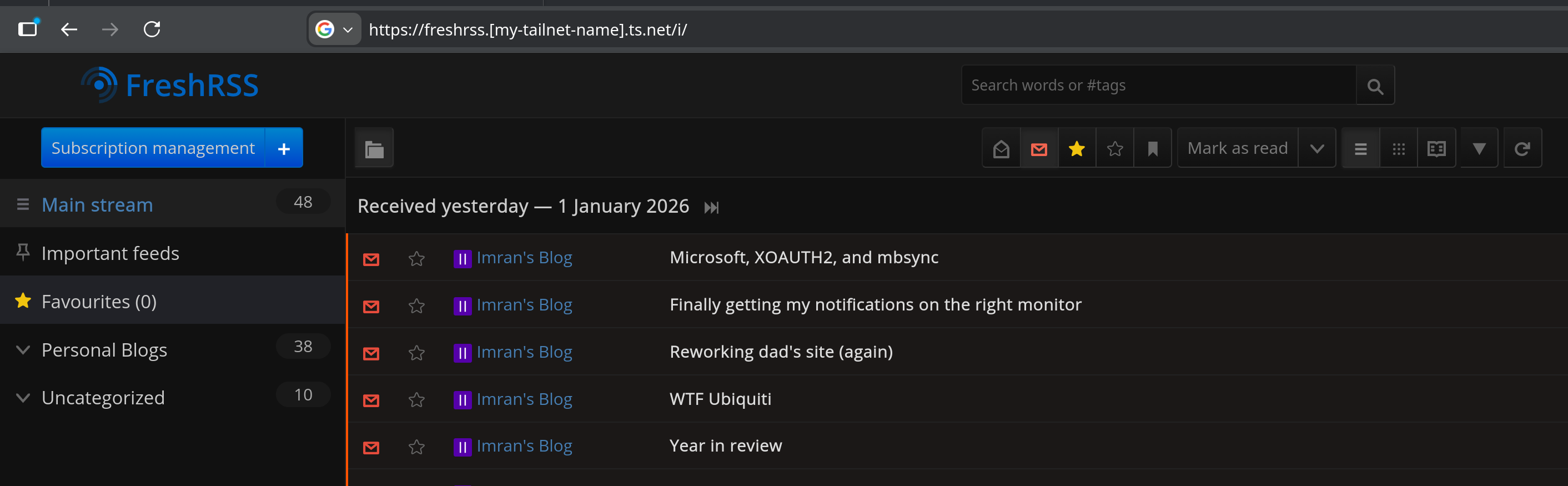
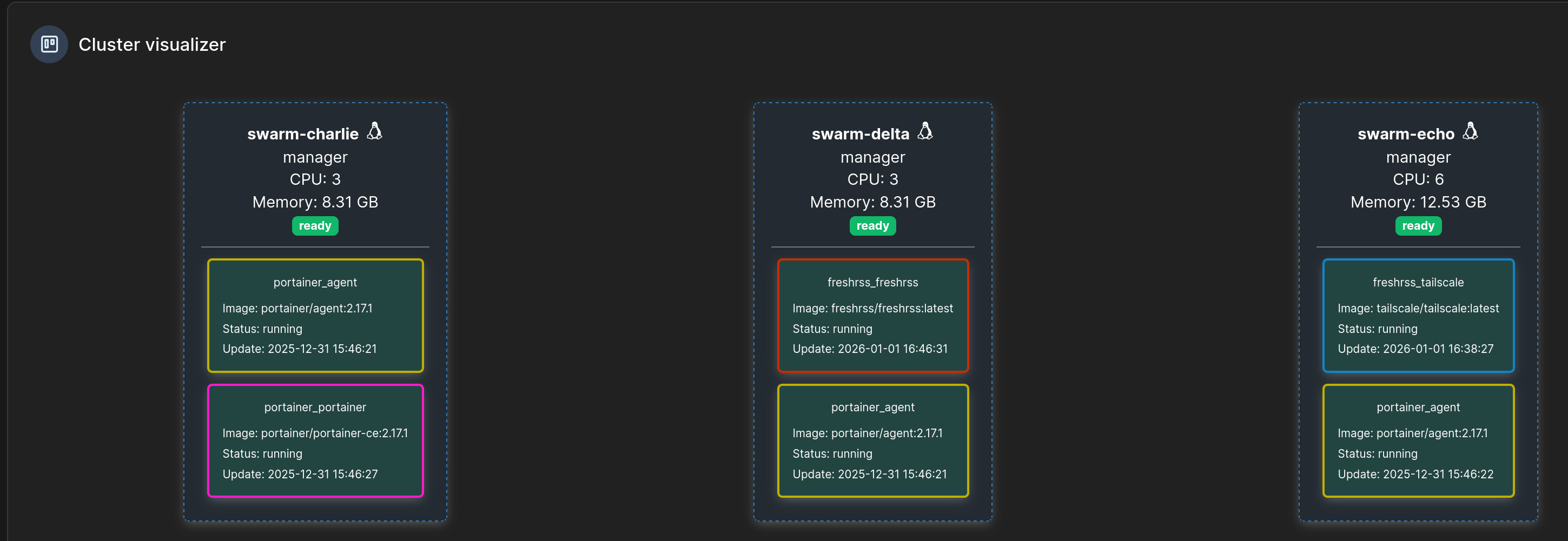
We have FreshRSS running on the Swarm with successful OAuth out over the tailnet to Authentik, even with the application and tailscale sidecar containers running on different physical hosts!
Was it worth all the complexity? Ask me in a few months, when I've hopefully migrated the rest of the Compose-managed services off my Unraid and onto the Swarm. Would NixOS have solved this? Also probably; I'm planning to investigate NixOS more a bit down the line. Declarative configs are very appealing to me. I also want to use Ansible more for managing the host-level setup, but Ansible scares me.
For now though, I'm very happy with this, and I expect to go through another rash of deploying a bunch of services for funsies.