The magic of Zigbee
tldr
I rigged several Zigbee devices and Home Assistant to power the following:
- An indicator light for when I'm on a call with either camera or mic active
- Various lights around the house kicking on at dusk, or when it's rainy/cloudy, with remotes for each room to override them
- (in progress) a notification when the washer finishes it's cycle so clothes aren't forgotten and don't get musty
What was I solving?
I've had several problems mentally earmarked for a home automation style solution for a while:
- Video call indicator light for the home office
- Automated lights as we're moving into winter
- Notifications / nags for when the laundry is done so it's not forgotten in the basement.
Problem the first: Video call indicator light
I work from home. There are two desks in the home office. One is mine and is where I typically work from during the day. The other is 'public' to the household and contains a workstation on the local domain, so either of my partners (or myself) can sign in and do... computer... things. Problem is, I often have meetings, some of which I'm on camera for, and the second desk is right in the FOV of the camera. My meeting schedule is also somewhat chaotic so it's difficult to predict or know when I'm on a call that's a sea of people (& thus off camera) or when it's a 1on1 (where I'm typically on camera).
Having an indicator of when I'm on a call at all would save me awkwardly indicating to someone trying to get my attention that I'm on a call and not just, say, listening to music, and having an indicator of when I'm on video or not would make it easier for someone to pop on the shared computer without fear of traipsing through the background of my video.
Problem the second: Do not go quietly into that good night
Winter is coming in the northern hemisphere, and by golly I hate being in a dark house. I've also learned I don't love having the gridded array of can lights in the ceiling on to combat the dark; while wildly effective at dispelling shadow, they are not cozy in the slightest and hurt my eyes and my psyche after about thirty minutes of being on.
We have several lamps, but turning them all on once it's dark and then all off again before bed is a bit fiddly. Ditto for the bedrooms, where the lamps have rocker switches that constantly fall behind other furniture, requiring some amount of fishing and searching to find them to toggle.
A wall timer would solve some of this, but "when it's dark" changes as the season shifts, and wall timers are difficult to override if, say, we want to watch a movie, or go to bed early.
Problem the third: The forgotten laundry
The laundry machines and furnace being a whole floor away from the main living space is a marvelous improvement upon apartment living, when laundry or air conditioning meant constant background noise to whatever we were doing.
The downside is it's significantly easier to forget about the laundry when it's an entire floor away. I've suggested setting (and carrying around) a timer when starting a load, but that was met with, shall we say, skepticism.
The Plan
Basically all of these are trivially solvable with some lightweight home automation.
For the office: Get an RGB light, toggle it to different colors depending on if I'm in a video call, voice call, or "idle."
For the lights: Smart switches and a timer automation! EZ.
For the washer: Modern smart switches can track power draw. I can put the washer on a smart plug and send a push notification (or flash a light or play a sound through a speaker) when the power usage drops back to idle as a wash cycle completes.
All I need is a home automation hub and some devices to hook into it.
What's Zigbee?
Zigbee is a radio and communications technology designed for low-power low-data-rate communication primarily used by Internet-of-Things devices. It supports meshing and low-effort configuration. It's build on the IEEE 802.15.4 specification, which has the following base requirements:
The basic framework conceives a 10-meter communications range with line of sight at a transfer rate of 250 kbit/s. Bandwidth tradeoffs are possible to favor more radically embedded devices with even lower power requirements for increased battery operating time, through the definition of not one, but several physical layers. Lower transfer rates of 20 and 40 kbit/s were initially defined, with the 100 kbit/s rate being added in the current revision.
-- Wikipedia
It's supported by Amazon Alexa which means it's widely available and (hopefully) unlikely to go away soon.
Why Zigbee?
IoT security is a nightmare. Whatever devices we got I didn't want to have internet access, which makes most of the wifi-enabled stuff non-viable, since they rely on phoning home to work. (I think Apple dictates that HomeKit enabled stuff works locally, but in any case, wifi is a very 'heavy' protocol for home automation stuff. I can eliminate entire attack vectors by pushing the devices off wifi.)
Zigbee is also much lower power than wifi, which enables things like battery powered remotes or sensors. I don't have an immediate use for this, but it's nice to have in my back pocket. You can even get things like zigbee water valves for setting up an automatic watering solution, which I will absolutely be doing next summer.
What's Home Assistant?
Home Assistant is a local-first home automation manager. It's easily selfhostable and has native apps for Android, Mac, and presumably others.
It seems to be the de-facto standard for selfhosters setting up their own automation. It's got extensive support for technologies like Zigbee, and with the mobile apps it's trivially easy to get things like camera and microphone state off my work laptop.
Putting it all together
The equipment
- SMLight SLZB-06 Zigbee to USB/Ethernet bridge
- ThirdReality smart plugs
- ThirdReality RGB bulbs
- ThirdReality button remotes
TBCH I did not notice everything was ThirdReality until it was all here, but they seem to have an entire storefront of home automation stuff, and so far it all works swimmingly, so no complaints.
Why an ethernet bridge? Why not USB or Wifi?
A variety of reasons:
- My homelab is in the basement, which would put a USB bridge very far away from the rest of the house. This shouldn't matter much, since Zigbee is a meshing protocol, but the forums are full of people saying how important link signal quality is. With Ethernet, I can put the bridge basically anywhere in the house.
- My homelab is also clustered, so the Home Assistant application could be on any one of (currently) three nodes. If the node hosting the app had to have the USB bridge then it would just make my life harder.
- I don't trust wifi. I'm something of a luddite in that, I know, but I just prefer to keep as much as I can on the wired network and leave the wifi free for laptops and phones and steamdecks. I also hate configuring things that don't have keyboards to attach to the wifi.
- I get a kick out of powering devices off PoE. It's very satisfying. I think I missed my calling as a network engineer.
The software
- Home Assistant! (surprise!)
- Also, Proxmox for hosting the Home Assistant server
The Setup
I installed the Home Assistant container using the Proxmox VE Helper Scripts repo, which is an amazing collection of scripts to quickly set up various applications you might want to self-host.
This one in particular spins up Portainer to drive the actual Home Assistant container on top of an LXC (which is also technically a container, but you can kinda sorta think of it more like a VM. It's not, really, and people who know better are already writing up a comment about how wildly wrong that is, but if you don't already know it's fine to abstract it for now, it's not that important to this post.)
I attached the LXC (the VM-thing) to my Tailnet so I can access the web console from any of my other devices without exposing it publicly, and we're off to the races!
I rigged a PoE injector and hooked up the bridge on an isolated VLAN. There's no reason for the bridge to try to reach the internet (as far as I know), but a layered defense is the best approach.
SMLight helpfully have docs on how to attach the bridge to Home Assistant, which is marvelous. I had to muck around in my network's firewall settings (that VLAN biting me in the butt) but once I sorted that it worked straightaway. Fro there, the big blue "Add Device" button is our next step:

As you can probably tell from that screenshot I currently have several devices attached, so... spoilers! That works too.
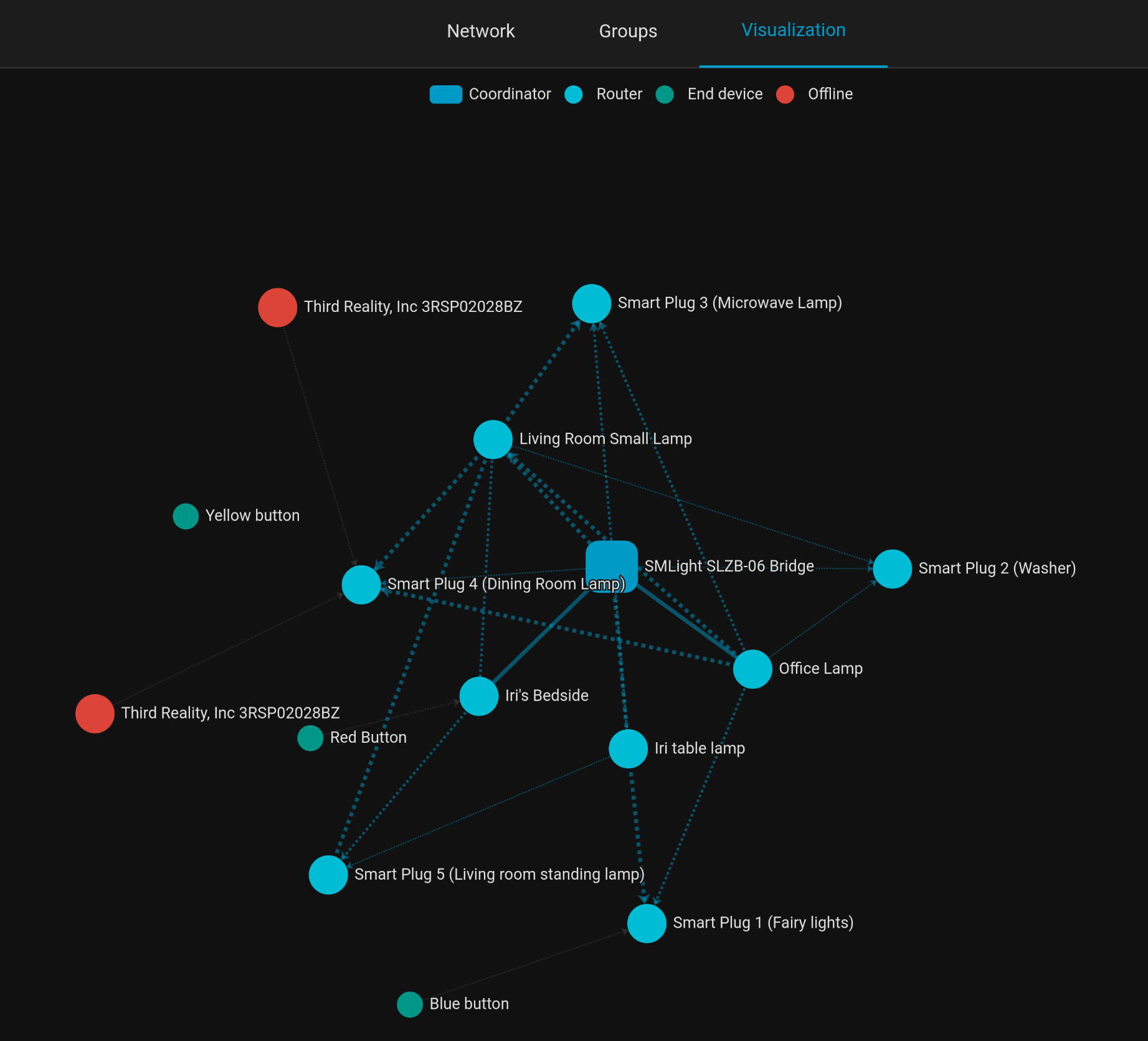
This is the mesh network. The blue square is the bridge, or the "Coordinator" in Zigbee-lingo. Blue circles are "routers," or devices capable of extending the mesh. The smaller teal circles are the single button battery-powered remotes, considered "end devices" by Zigbee because they're not capable of extending the mesh. And I'm pretty sure the red circles are a couple of smart plugs I had hooked up long enough for the network to notice them, but not long enough to pair. I have no idea what the various lines mean; there's some frustration in the forums over there not being a clean legend. Some people have spelunked the source code for the visualization renderer, but I've already forgotten what they found.
The pairing process is extremely straightforward; I have no idea what the standards at play are, but Home Assistant immediately identified each device and it's capabilities: smart switches RGB bulb vs remote; brightness for the bulbs, power measurement for the switches, single and double tap on the remotes, all just automatically identified and usable within the HA interface.
| Bulb config panel | Plug config (just a toggle) and monitoring | Remote config (and past actions) |
|---|---|---|
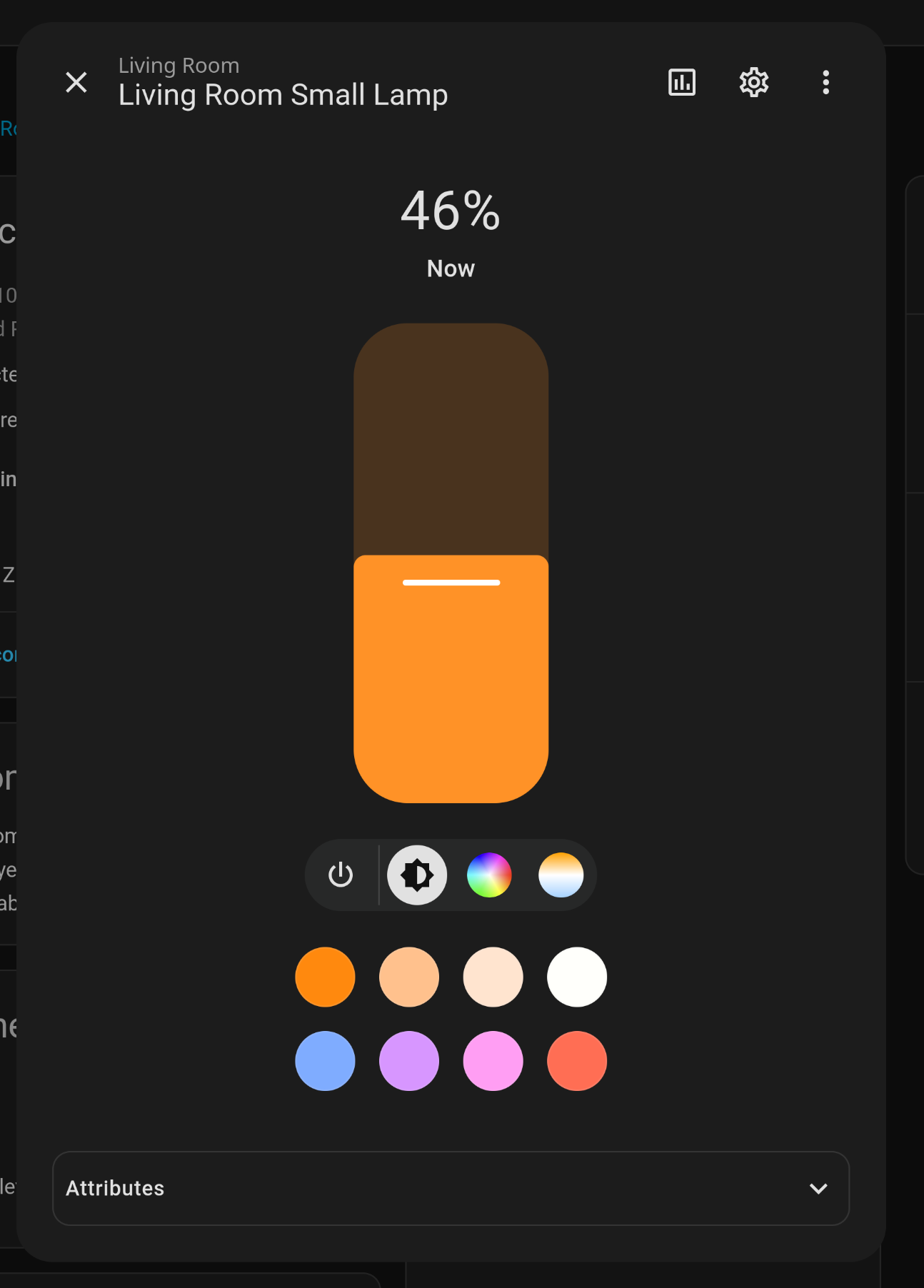 | 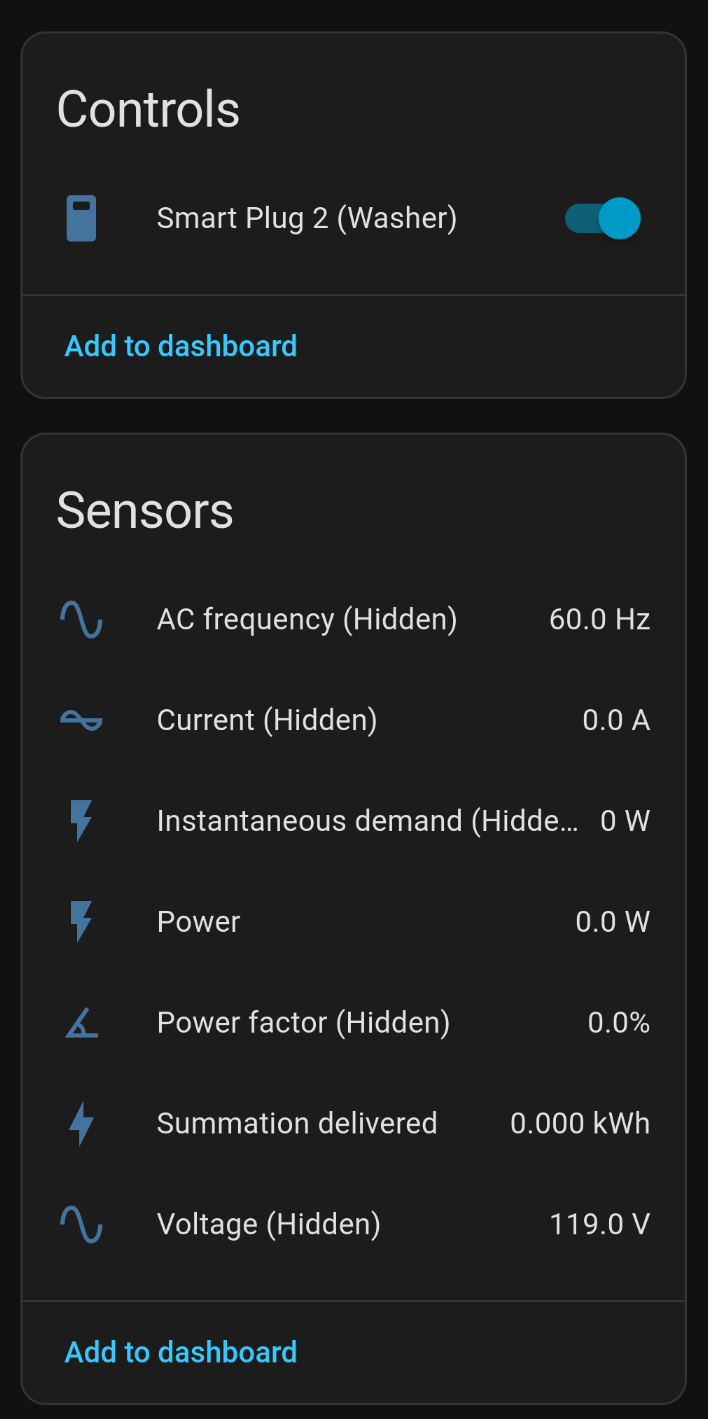 | 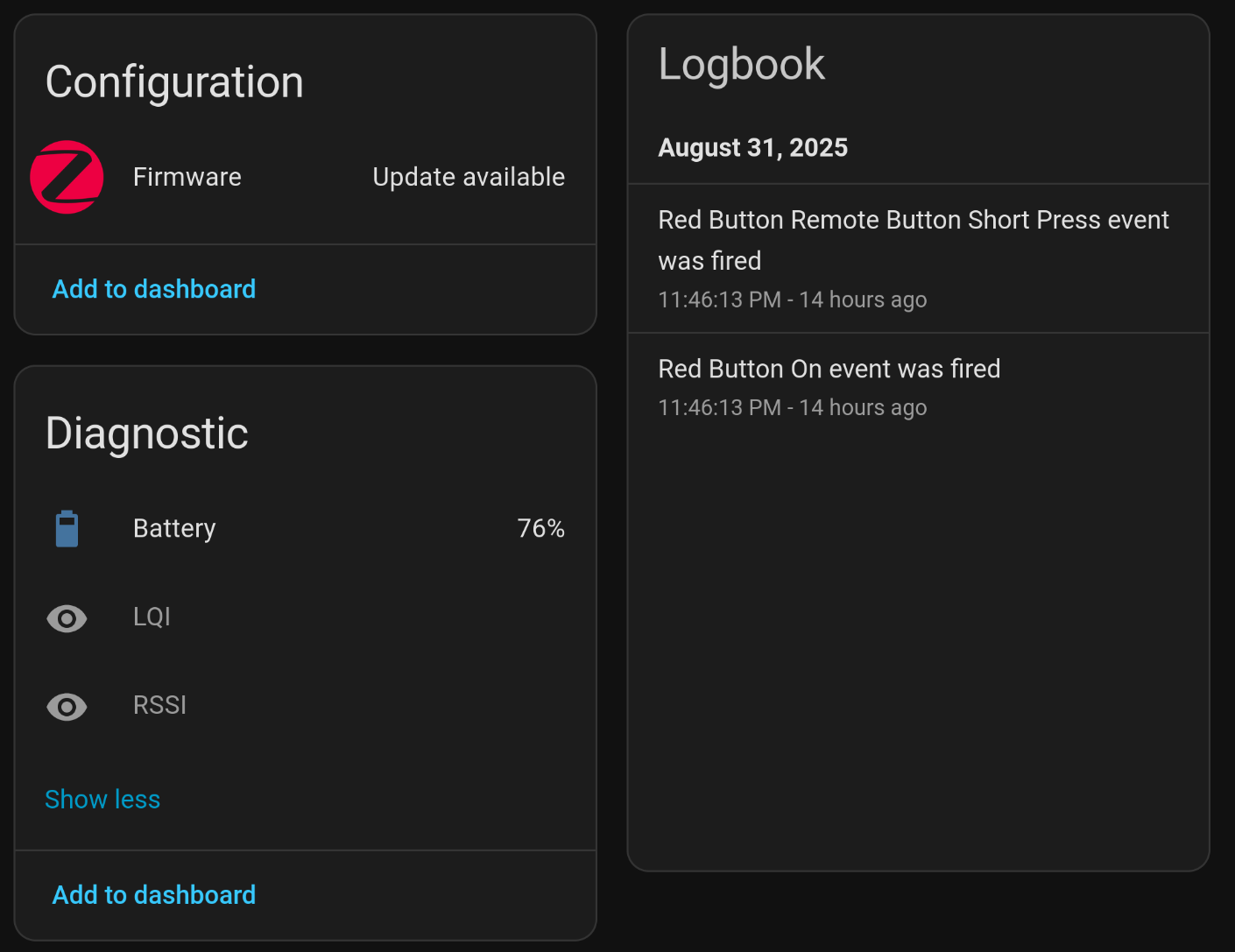 |
I didn't do anything besides hit "Add Device" and then rename them accordingly. HA picked up their capabilities and hooked up the UI itself.
The Automations
Of course, having devices attached to Home Assistant is only half the work, the other half is configuring automations to Do Things to those devices.
I don't know what I'm doing
Take all of the following with a grain of salt. I've only just started working with Automations and I can already tell I'm doing things wrong, or ways I want to change my setup. I'll call them out as I go, but this is definitively not a best-practices guide.
Configs as YAML
Within the HA world the preferred way of expressing configurations is in YAML, like this:
alias: Washing done -> notify
description: ""
triggers:
  - type: power
    device_id: 7a6dddd06827d4424668833bcd3ed525
    entity_id: e9e366da77b0660d177368444061643c
    domain: sensor
    trigger: device
    below: 5
    for:
      hours: 0
      minutes: 5
      seconds: 0
conditions: []
actions:
  - action: notify.send_message
    data:
      message: Washing machine returned to idle.
      entity_id: notify.lighthouse_washing_machine
YAML is more flexible than the UI configurator, and there are several features not yet in the UI (e.g., selecting a scene by name), but the UI rendering is rather easier to understand than the YAML as a starting point so I'll be using screenshots of the UI for this post.
Here's my automation for turning the lights on a bit before sunset:
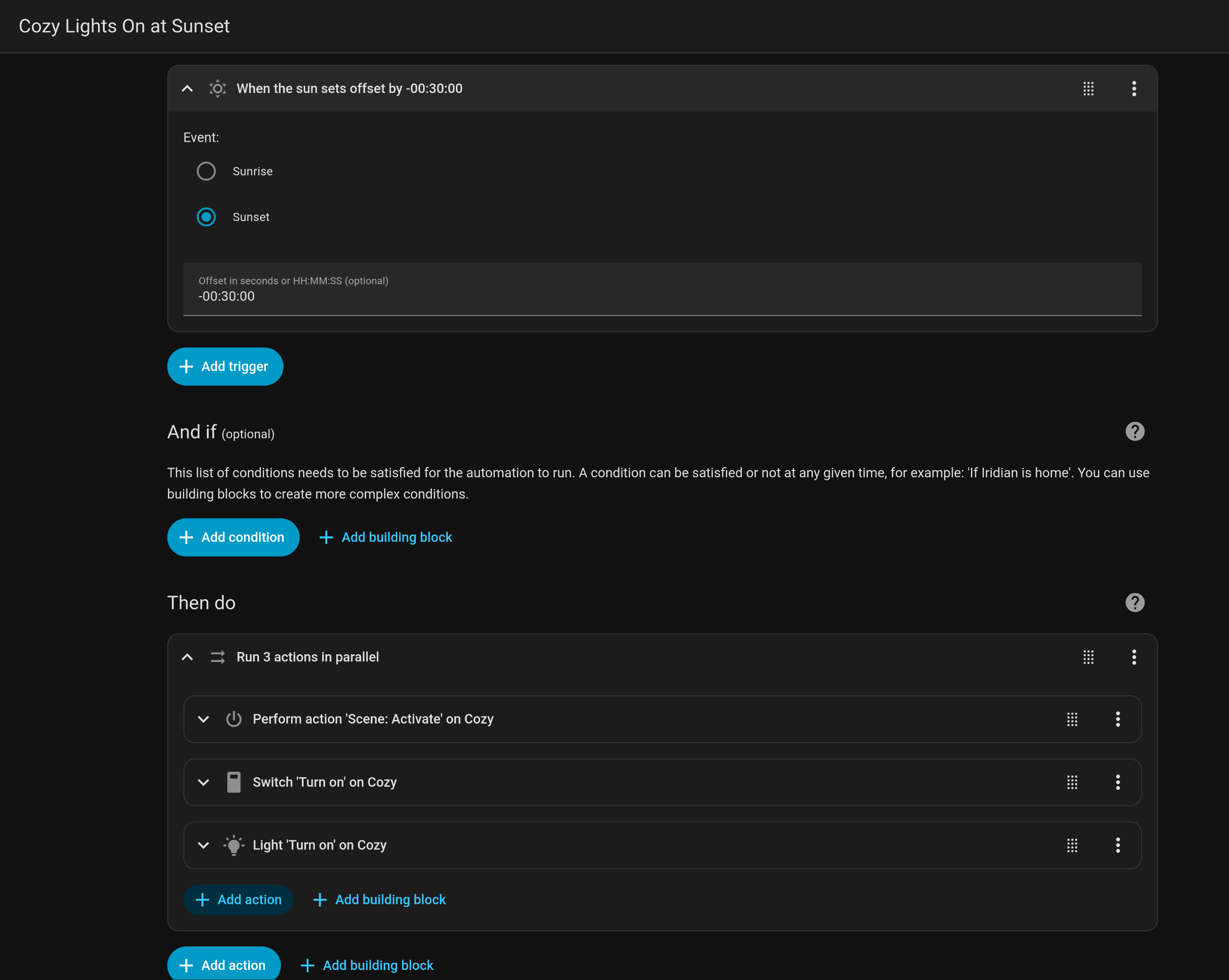
Automations are composed of triggers, conditions, and action. A trigger is some kind of instantaneous event: a sensor on a device changing state (light switch -> on), a timer (every 30 minutes), a webhook is called.
A condition is, well, a condition: is a certain other state true? Does a specific string appear in a sensor's state?
And an action is what yo might expect; toggling a switch on, changing the color of a smart bulb, sending a notification to a phone.
My automation here is fairly straightforward: 30 minutes before sunset, activate a scene (we'll come to that), toggle every switch labeled "Cozy" to on, and toggle every light labeled "Cozy" to on.
I originally just had the actions to toggle the lights and switches. "Scenes" appear to be the preferred way of organizing sets of states for multiple devices and I'm slowly migrating to them.
Of course ,there are times when one may ant to turn the lights off in the evening, say, if you're about to watch a movie... So here's an automation to do just that when a button on a remote is pressed!
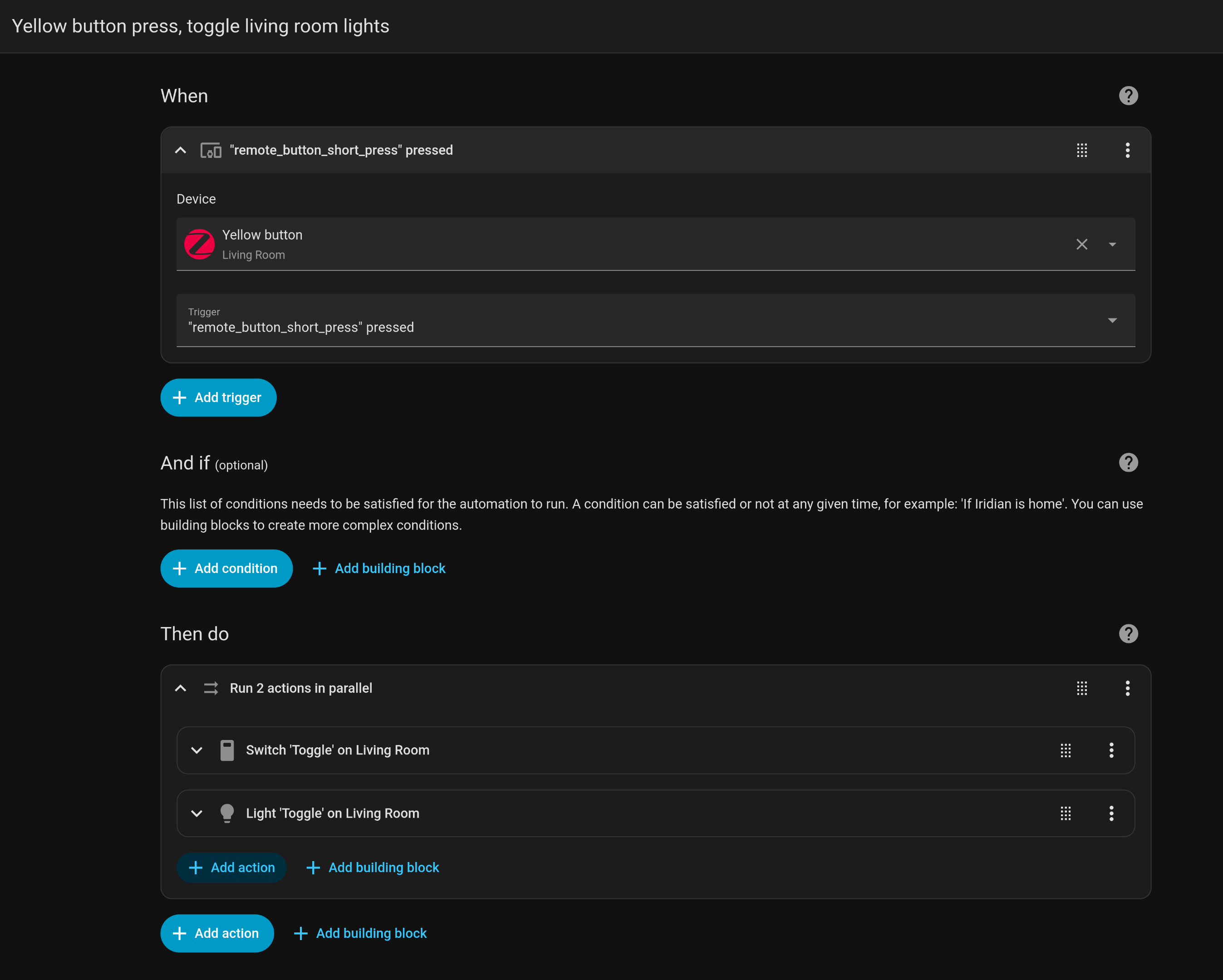
Here our trigger is a short press on a specific remote. (HA is clever enough to know multiple kinds of presses are exposed by this remote: single short, double short, and a long press.) This remote lives on my coffee table in the living room and near the dining room.
A note on 'helpers'
'Helpers' are pseudo-devices within HA whose states can be driven by other automations as a way to further compose automations. My main issue is that states triggered by human actions are frequently overridden by automations, e.g. if I turn the lights on because it's slightly dark, but then HA checks and sees it's sunny, so it turns the lights off.
With a helper, I could set a pseudo-switch when human action is taken and use that as a condition on the weather automation... Or something similar, I'm not sure what exact approach is best. I'll do some explorations and post about it down the line.
The Office Light
The automations to drive the office light are slightly ridiculous. I should refactor them, but I've been distracted by other things.
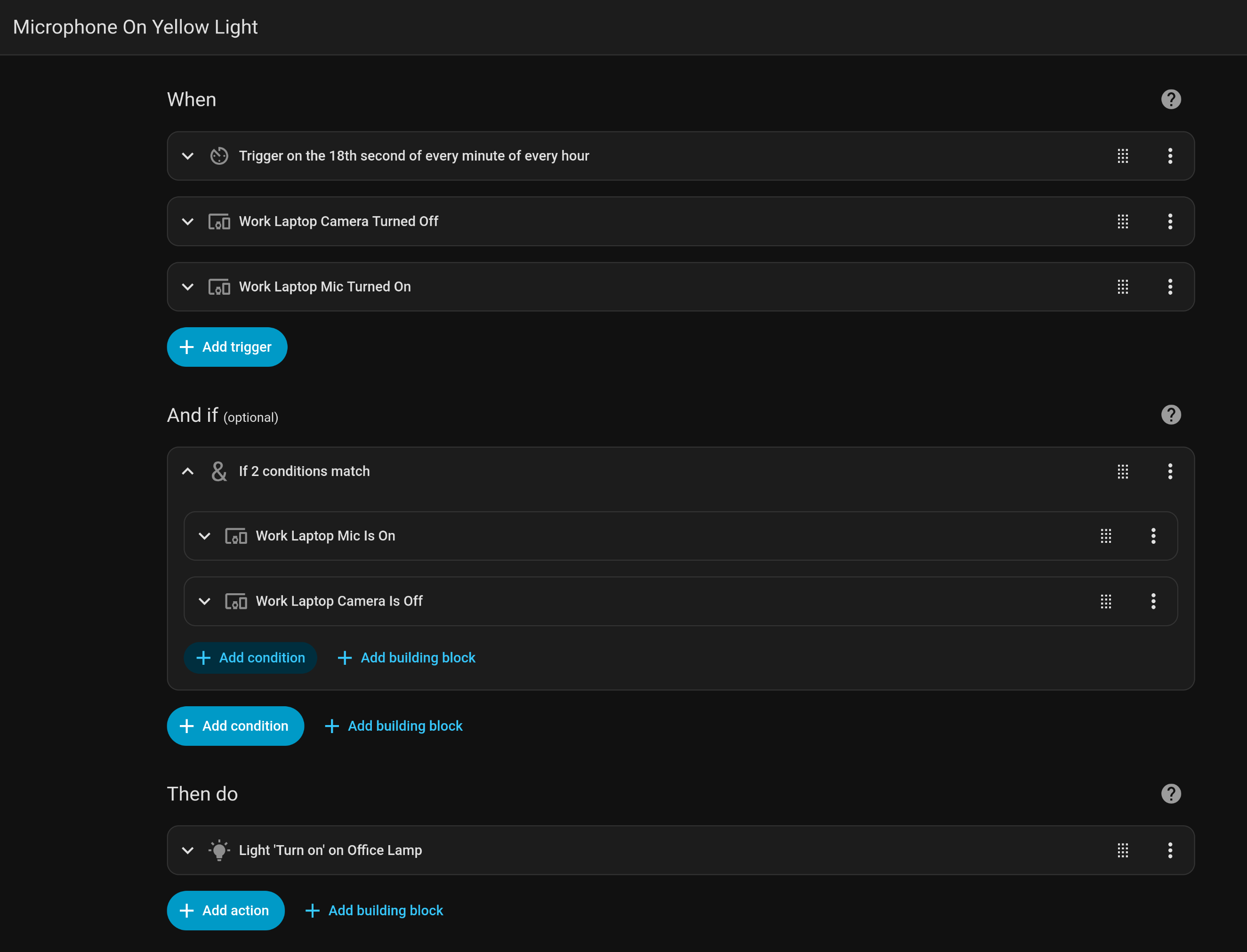
Here's the automation to drive the light turning yellow when the mic is on:
And the specifics of the config on the lamp, including the color:
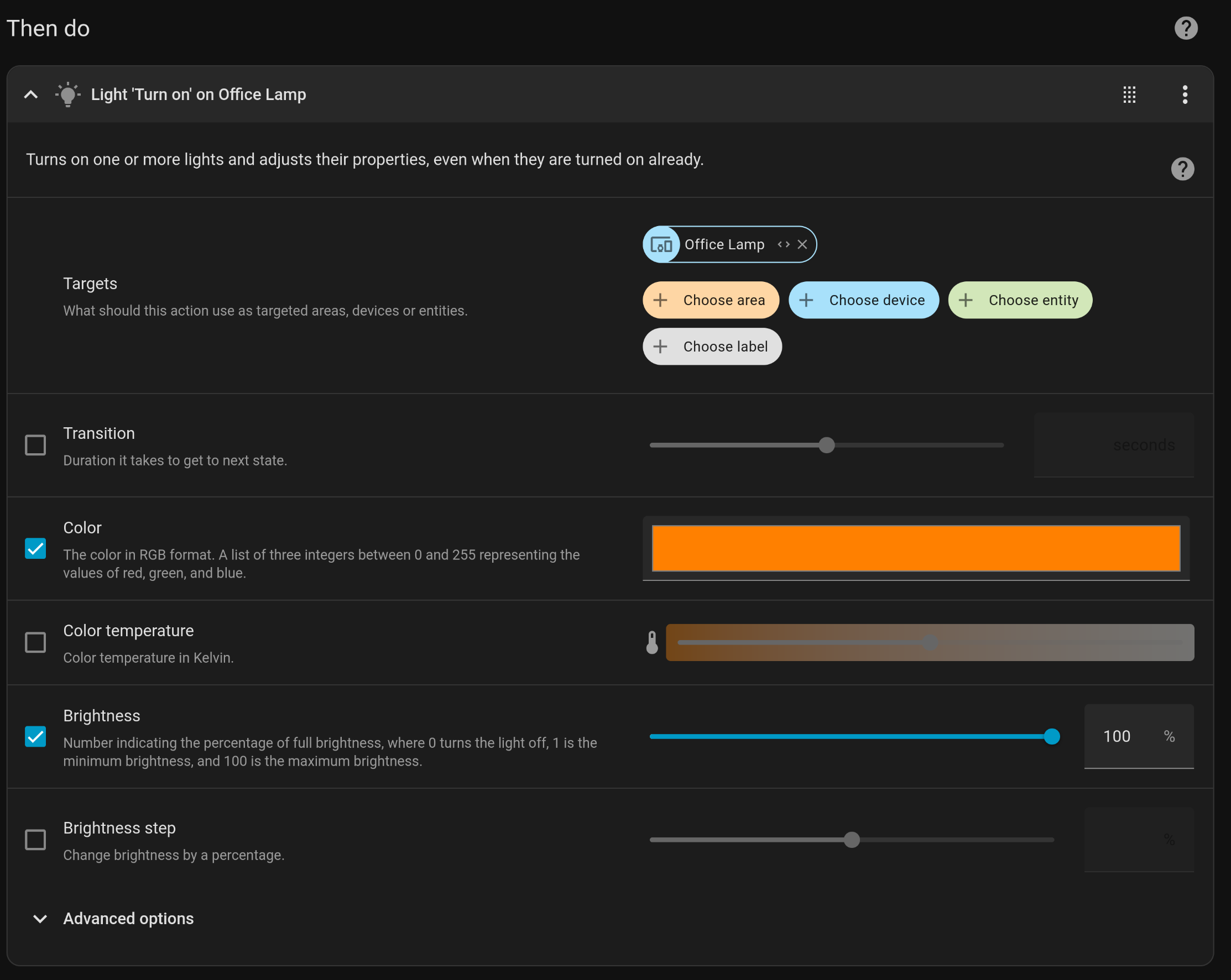
You can see how this is a bit... Messy.
The triggers operate independently, or like one big "Or": The automation will begin evaluating the conditions when any of those events fire. Originally I built the automation just off the timer and the conditionals: every minute we would check to see if the mic or camera were on and set the light accordingly. I figured out it'd be more responsive if I used the state change triggers on the mic and camera themselves (e.g. "mic turned on" or "camera turned on").
I want to refactor this into each of the possible triggers (mic turned on, mic turned off, camera turned on, camera turned off, timer) instead firing a shared even that evaluates what state the light should have and then setting it, likely using a couple helpers.
The Washer Plan
The plan is relatively simple: when the power draw of the washer drops to 0 for long enough that it's probably not just a pause between modes, send a push notification via ntfy.
My initial sketch looks like this:
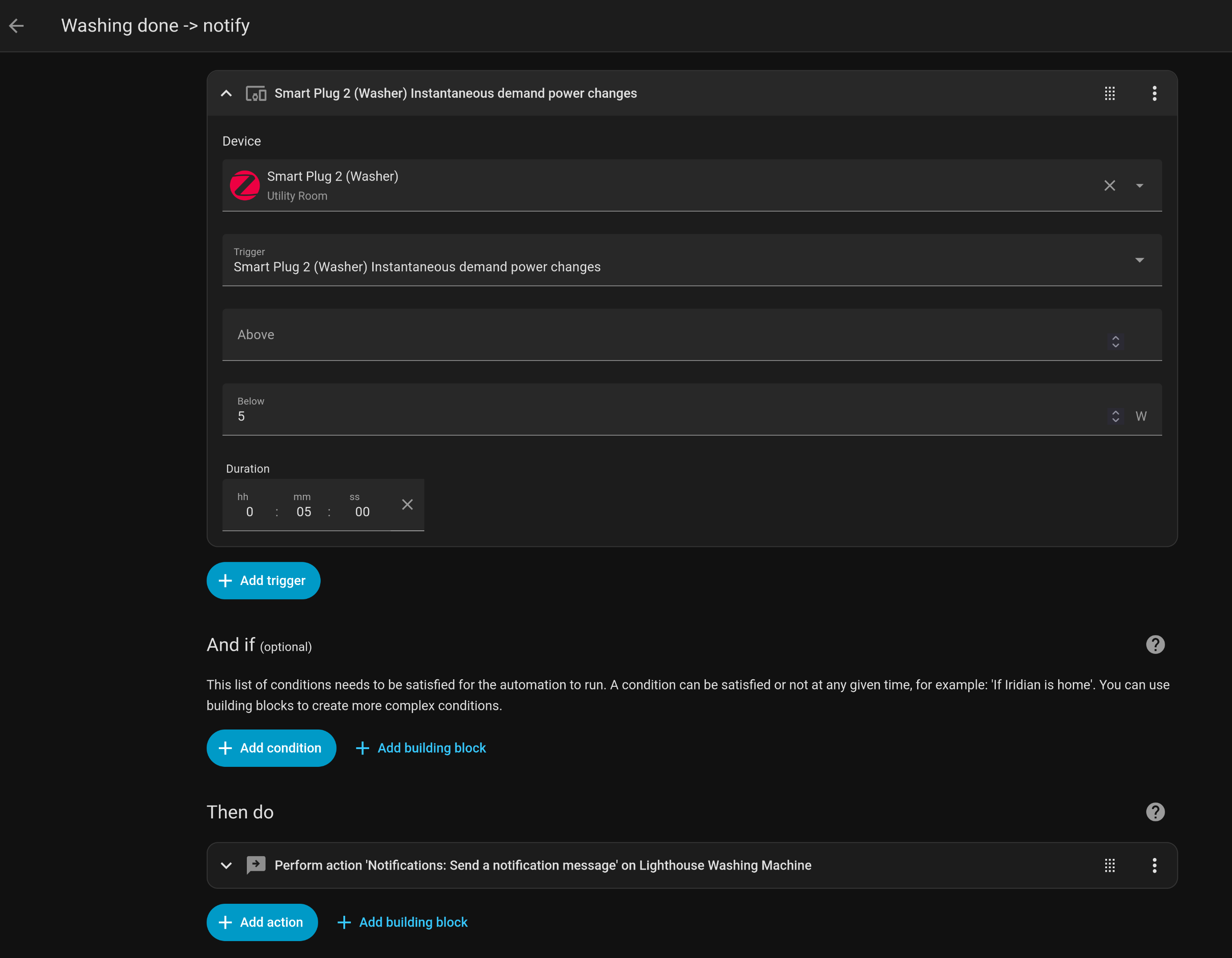
I haven't tested it yet, so I can't say for sure if it works, but it seems a reasonable starting point.
What's next?
I have SO MANY ideas!
- Flashing a light when a thunderstorm warning is posted so we can medicate the dog
- Setting up a touchscreen for my partners to toggle lights or view the radar feed from the weather automation
- Use a door sensor to alarm when the fridge or freezer are left open
- (next summer) automatic watering during our community's designated watering hours